MCPE DL

Mods, Maps, Skins, Seeds, Texture Packs

Published on April 03, 2020 (Updated on August 13, 2020)

NormaConstructor (Beta)

A multiplayer-compatible, UI-supported, and programmable(yikes!) worldedit-like addon based on Scripting API. Still in early development, so we welcome any advice - join our discord/QQ group!

Developed with ♡ by NorthernOceanS.

THIS PROJECT IS IN EALRY DEVELOPMENT SO IT ONLY HAS FEW FUNCTIONALITIES & MIGHT BE BUGGY.Share your idea & advice!

QQ group: 820683439
Discord: https://discord.gg/HUcknnV

Join our server to have a taste of it:114.215.181.102:19132

NormaConstructor is a worldedit-like addon that takes advantage of the Scripting API.

Download:

Navigate to the link provided below, and download the circled.
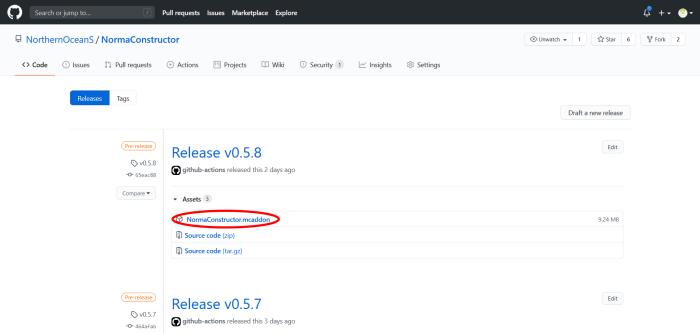
(You just need the latest version.)


Usage:

Type /function getTools to get the set of...well, tools.

Refer to the video to learn how to use it.


(I've already received complaints that the procedureis too complicated. There is a workaround now. Turn ON the options on the left side of the UI, so you can get multiple data with one click. For example, by turning all three of them on, you will just need to set the length, place a block and click with the stick.)


I mention that the addon is programmable, but I was too busy providing a documentation. If anyone is interested, contact me through discord/QQ.


Hope you like it.

Select version for changelog:

Changelog
  • Add a video to explain how to use it.
  • Minor adjustments to words and phrases.

Supported Minecraft versions

26 Responses

Comments 26
4.8 / 5 (5 votes)
1
God script Can u make a hacking cilent or more better
Log in to Reply
This page is pretty old, so here's how to download and use the addon if you're having trouble.

Download the newest version of the addon from GitHub by clicking "Releases" instead of v0.3.2 .mcaddon.

To use the addon, DO NOT try to use the tools listed in the description of the addon. Instead, type

/give @s normaconstructor

in the command prompt, and press tab until you see the tool you want. You can then use the addon like normal. All of this works as of Release 0.5.1 on minecraft Win10 version 1.16.1.
Log in to Reply
None of the tools work. When I place a block the script seems at least do something, but none of the tools work whatsoever. I have tried every version from your GitHub, as well as asked for help on your discord.
Log in to Reply
1
Have you toggled experimental mode on?
Log in to Reply
1
Link is broken
Log in to Reply
Guest-4082060752 May 17, 2020 at 4:07 pm
is there a way to undo something or to fill a place with air?
Log in to Reply
Help. I can't open the UI with the iron sword.
Log in to Reply
1
Have you turned on Experimental Gameplay? What about other tools?
Log in to Reply
Yes, I've turned on Experimental Gameplay. Other tools also don't work.
Log in to Reply
except the wooden axe
Log in to Reply
How do I get the block?
Log in to Reply
1
Can you make a version compatible for mcpe on iOS?
Log in to Reply
1
No...I suppose there isn't anything like blocklauncher on iOS, and on top of that, I don't have such a device.
Log in to Reply
It is possible to do it on iOS......simple download the app “Documents by Readdle” then after downloading normacraft just transfer the file from files to documents by readdle then rename the file and just remove the “ .mcaddon “ from the ending and make it “ .zip “ after that it will process..... then when u click on the file it will create another files with 2 more files inside it these two will be the resource and behaviour files then respectfully place in the Minecraft part in files.....
Thx
Log in to Reply
1
The problem isn’t that, we all know about Documents. The problem is that IOS DOESN’T SUPPORT SCRIPTS! I hate people who don’t know what they’re talking about but talk about it like they do just like u
Log in to Reply
1
There was an Addon called the Slappers! Addon that does have custom GUIs, but doesn't reauire scripting API, is it possible to update this Addon to the latest beta without the use of scripts?
Log in to Reply
LOL

It's not a custom GUI. NPC already in Beta Bedrock 1.15.~

Just typing /give @p spawn_egg 1 51 and then you will having an NPC
Log in to Reply
doesn’t work :(
Log in to Reply
Maybe u can search about NPC in minecraft gamepedia. They give you information about it.

And before you play the world. Please active the Cheat and experimental mode
Log in to Reply
and education edition toggle
Log in to Reply
That one is right click not left click so shut
Log in to Reply
make a way to make it compatible with mcpe thru blocklauncher
Log in to Reply
1
I remember blocklauncher can force mcpe to turn on its support for the Scripting API, thus my addon.
Log in to Reply