MCPE DL

Mods, Maps, Skins, Seeds, Texture Packs

World Edit Paint Brush

Create a mountain in minutes with this one addon! Super helpful for any terrain related projects! This addon adds a little brush, which will give you super scultping powers! - It's super easy to understand and get the hang of!

This scripted addon allows you to sculpt almost any form of terrain! All you need to do, is hold the paint brush & click!

Tutorial Video :


How to setup :

Step 1: Install the pack, and put both the behaviour, and resource pack onto an existing or new world.

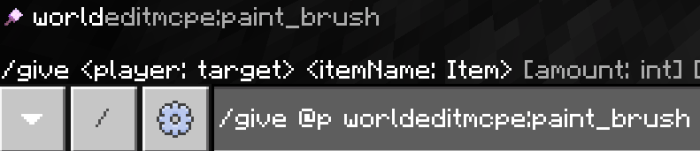
Step 2: Give yourself the paint brush.

Step 3: Setup your hotbar like so :

... with the paintbrush in the first slot, and the building materials in the last 3 slots. If you only want to use two different block variants, place them in the last 2 slots, and if you only want to build out of one block, place it in the last slot. If you want to build with air, leave all 3 of the last slots empty.

Step 4: Look anywhere near you (must be looking at a block), and right click/long-tap. You can also hold right click to build a lot of land at once. Don't spam this too much, as it may cause lag.

Extra notes : Make sure to enable experimental gameplay!

Supported Minecraft versions

81 Responses

Comments 81
4.15 / 5 (34 votes)
1
wtf. how do you even find the brush
i wrote in the command and it said that it does not exist T R A S H
Log in to Reply
1
Can You Use Blocks From Other Addons?
Log in to Reply
1
Works in 1.16.4 fantastic if you can add even more options that would make it even better as it already beats all other brush addons for Bedrock
Log in to Reply
1
Mine wont work, even with experimental gameplay on. I keep getting syntax error
Log in to Reply
hey man, thanks for making this mod! it helps me a lot especially when im trying to make terrains and im glad that this mod can use multiple blocks in 1 brush haha. the only thing that bothers me is that i usually use small brushes. so it would be a really big upgradeif you can add different brush sizes. again, thanks :)
Log in to Reply
this gave me a virus
Log in to Reply
are you trying to make people not download this or is it just that you never downloaded it yet
Log in to Reply
It doesn’t, it works just fine.
Log in to Reply
Very good mod even i did an high mountain much higher than normal mountain even good for decorate your server if you want to add an nice mountain but i think the best way to do this is you have a mouse cause if you in laptop it is slight hard
Log in to Reply
Finallyy. someting for windows
Log in to Reply
This script works! I would love it if you added fill and clone commands too in it like in worldedit style.
Log in to Reply
Im on iOS and it says my device doesnt run scripts, why not?
Log in to Reply
Because scripts are only for windows 10
Log in to Reply
Guest-7278049838 May 25, 2020 at 8:43 pm
so I'm playing on windows 10, and I,ve done everything right so far, but when I type in the "/give @p worldeditmcpe:paint_brush" command, it says syntax error. What do I do?
Log in to Reply
1
You probably didn't turn experimental gameplay on
Log in to Reply
you need to turn on rhe experimental gameplay
Log in to Reply
Are you on the [EX]world if u are dont use it because its a test world u use the actual world not the [EX] world
Log in to Reply
THIS RUINED MY GAME WHEN I PUT IT ON MINECRAFT IT WAS JUST ON A WHITE SCREEN AND STILL IS SINCE 2 DAYS AGO
Log in to Reply
1
Guest-9293815433 May 09, 2020 at 9:10 pm
it says here that "the world you are trying to enter requires your device to run script. your device doesn't support scripting at this time, so you cant join from this device" what does it mean?
Log in to Reply
Guest-1315119795 May 15, 2020 at 1:58 am
I'm not sure exactly why this happens but I'm pretty sure this occurs on all versions of bedrock, but freaking microsoft hasn't gotten script support out for anything else besides pc as far as i'm aware of. This isn't a problem from the dev its a microsoft problem, basically you can only run this and mods that use script on pc.
Log in to Reply
Guest-4908390555 May 19, 2020 at 1:27 am
You'll need to open your world on Minecraft Bedrock for Windows 10, since that is the only version that supports scripting, as far as I know.
Log in to Reply
You can only use scripts on Windows
Log in to Reply
1
Nice mod! But could add ways to copy and paste stuff!
Log in to Reply
1
You can actually do that using the /clone command, or for more simple way use the structure block! use /give @s structure_block to get one
Log in to Reply
Guest-5999377328 May 04, 2020 at 1:53 pm
Amazing! I suggest adding different brush sizes
Log in to Reply
Guest-4119794140 May 02, 2020 at 9:34 pm
Great bro
Log in to Reply
really good paint brush and quick tip ( use the light block to erase blocks) ( give @a or ur name light_block 1 15) do the same process and boom u got 2 tools xd
Log in to Reply
nvm u dont need to use nothing just keep ur inv empty and u have the same result xD
Log in to Reply
It won't give me the brush! I put the command ecxacly right!
Log in to Reply
Guest-9756008318 May 01, 2020 at 8:45 pm
are you sure you put experimental mode on?
Log in to Reply
can it work on android?
Log in to Reply
This addon its great thank you sooo much for doing this i love it
Log in to Reply
i forgot, could you also add a way to put water? thanks
Log in to Reply
1
you need to use the water block, its a secret block but you can find it using some behaivour packs or worlds
Log in to Reply
It would be nice if you can add different brush sizes and smooth tool. Btw this addon is amazing!
Log in to Reply
i could not get this to work on 1.14.6 is all installed fine but when i went to give it to myself it was not there.
Log in to Reply
Use experimental gameplay.
Log in to Reply
There’s no behavior wh3n I download it, just the resources
Log in to Reply
I found that the brush can't manage different color from a kind of blocks。Please fix it.
Log in to Reply
He put a message on the screen @ 0:56 saying that you can't use the different colored blocks because of a limitation of the scripting API, and that he will fix it once there is a new method.
Log in to Reply
1
thanks for answering the question for me :)
Log in to Reply
Can you make for IOS?
Log in to Reply
Good script. But why does it slow you down if you use it?
Log in to Reply
1
it's just limitations with the setblock command, since it needs to execute that command for every single block it places, and as we all know, minecraft isn't the most optimised game lol
Log in to Reply
because it's randomising the blocks from the last 3 slots of your hotbar, and it's not very optimised :P
Log in to Reply
What’s the decryption key?
Log in to Reply
Nvm I got it to work forgot ex gameplay
Log in to Reply
um I got it it wont let me get the item tho I tried the command it wont come up, anything I can do?
Log in to Reply
Sad, different coloured items that have multiple replicas only are spawned as the white version... Please fix this
Log in to Reply
lol too bad for android and ios users

IM ON WINDOWS 10
Log in to Reply
1
It just had to be a script. Scripts can go to hell
Log in to Reply
scripts are good. that's a fact.
You can do so much more with scripts, than without scripts.
Log in to Reply
Just because you don't know how to use scripts doesn't mean they are bad, Cymon.
Log in to Reply
1
Nice Work dude!
It really helps me with my terraforming!
Log in to Reply
Can you authorize me to reprint this Addons to the Chinese Minecraft.What I need is business authorization
Log in to Reply
Can you authorize me to reprint this Addons to the Chinese Minecraft.What I need is business authorization.
Log in to Reply
I had a problem, when I installed it my character's animation started to work badly, I don't see my hand, when I walk I don't do the animation, I just look like a statue (Windows 10)
Log in to Reply
Thanks! One of THE best add-ons on Mcpedl! Keep working and develop this. More brushes. more kinds of buiding. Maybe a UI! instead of 3 first slots!
Log in to Reply
1
Really love this addon. So cool, made a first mistake by burying my horse in dirt and killing him. Any way to change the brush size and shape?
Log in to Reply
Its not working in 1.14.30
Its says that it cant use scripting in my version
Log in to Reply
i've heard i can if you install an app called blocklauncher which is how mcpe got mods back in the day
Log in to Reply
Is there an undo or a way to change your paintbrush size?
Log in to Reply
How can i use scriptd?
Log in to Reply
1
You have to be using Windows 10 edition, and must enable experimental gameplay
Log in to Reply
Nice can you add a fusion to the paintbrush you can change the land to what every you want
Log in to Reply
1
CalvinGameing_YouTube April 07, 2020 at 5:38 pm
Noo scripts?????????????????
Log in to Reply
Don’t work, says it runs scripts?????
Log in to Reply
Yeah, you have to let the scripts run.
Log in to Reply
1
Been waiting for this, im so pumped! Will defo come in handy for maps.
Log in to Reply