
MCPE DL

Mods, Maps, Skins, Seeds, Texture Packs

Published on January 22, 2020 (Updated on January 24, 2020)

WorldEdit for Bedrock Edition

This is a Bedrock port of the popular WorldEdit Minecraft mod. This lets you quickly fill out areas with blocks without having to place them all or remember your coordinates to use /fill.

This addon works similiarly to the original Java version.


How to use:

First, get a Fire charge. You can pull it straight from your creative inventory or type out "/function worldedit/wand" to have it put in your hand.

Now, you have to select two points where you want to fill all the blocks in between. To do this, right-click with your fire charge on the two blocks. If you mess up, just do it again. It is always the last two positions you selected that count.
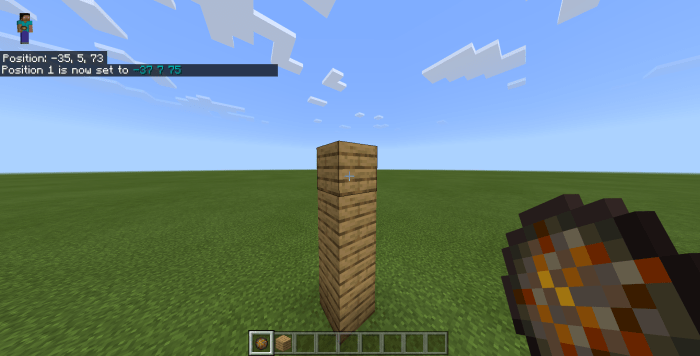
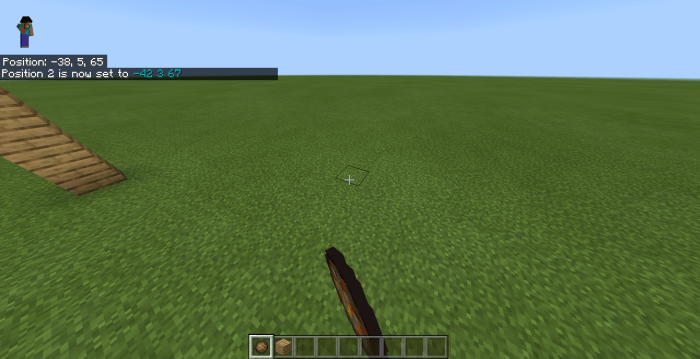
Now it's time to fill the area.  Grab the block you want to fill it with, and type one of the following commands:

  • /function worldedit/fill - This is the most basic one and fills out all blocks between the two points.
  • /function worldedit/fill-walls - This creates four walls.
  • /function worldedit/fill-borders - This filla out all borders, making a hollow box.
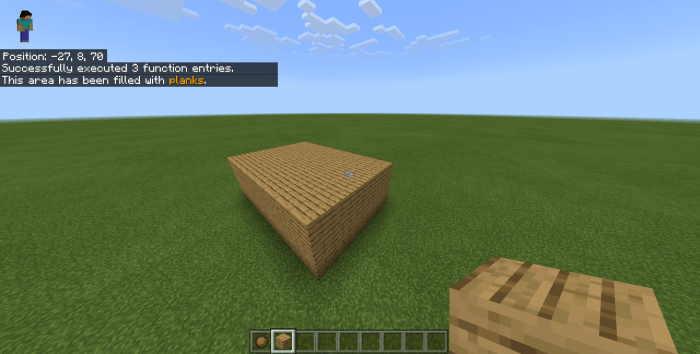

If you are holding an invalid block, while you're typing it, nothing will happen.

To copy-paste an area, select it using the fire charge, go to where you want to paste it and then type /function worldedit/clone

This was last tested on version 1.14.1 so if you are playing a later version, bugs might appear. If you have any feedback, please leave it in the comments or send it to [My username]@gmail.com (Avoiding web crawlers from finding and spamming my email :] )

NOTE: This addon does not yet support multiplyer, however I am considering supporting it in the future.

Select version for changelog:

Changelog
  • Added /function worldedit/clone
  • Added error message for multiplayer (This does not support Multiplayer yet)
  • Other minor tweaks

Supported Minecraft versions

250 Responses

Comments 250
4.12 / 5 (76 votes)
1
Doesn't even work ya stupid idiot who forgot to cook the rice.
Log in to Reply
1
Could you update this to version 1.16?
I want this.
Log in to Reply
1
Pls make for 1.16.2
Log in to Reply
1
remember to read the comment made by the creator
Log in to Reply
1
hi! your version of worldedit is as good as i can find but... pls make a folder version then zip it cause my minecraft (bedrock PC) cant use .MCWORLD/.MCPACKs please and thank you
Log in to Reply
1
and its not just cus i have 1.16
Log in to Reply
1
WHAT!!!! WORLD EDIT IN MINECRAFT BEDROCK EDITION NO WAY THIS ACTUALY WORKS! BRO WHAT!!!!!!!!!!!!!!!!!!!!!!!!!!!!!!!!!!!!!!!!!!
Log in to Reply
1
Update it please. We all are waiting here. I love this script, so simple yet so useful.
Log in to Reply
1
Hello again.
In 1.16, Mojang changed the scripting API so that it is no longer possible for an addon to detect which block a person used a fire charge on.
This means the current version no longer works after 1.16 and the update I'm working on has to be further postponed because I have to find a new way to make this work.
I'm hoping to release the update in July, but please don't get your hopes up because this might not happen after the sudden change in the scripting API.
Log in to Reply
are you working on a update of this mod?
Log in to Reply
1
d'accord hâte de retrouver ce addon !
Log in to Reply
Can you please update PLEASE!!!
Log in to Reply
Please update pls and you don't need to use block launcher because it's F
I love to build I am making great constructions with my sister and we took many and we need this to update it already it is July. I'm not exhausted like you said, but I hope if the update comes out.
Log in to Reply
1
Keep up the good work man. hope you find a work around soon.

Started building a computer in redstone and i do not fancy building an 8-bit register over and over.
Log in to Reply
1
Très bon produit ! je l'utilise depuis un moment et il m'aide énormément ! Cependant la version 1.16.0 n'est toujours pas prise :( Mettez à jour votre mod au plus vite, j'ai de la construction qui m'attend :D
Log in to Reply
I can’t download it on iPad can u help me plz
Log in to Reply
plz add schematic function or its useless copy past is already in the game same with fill and all that
Log in to Reply
bu as el del acha bububu
Log in to Reply
Its not working. Minecraft just released 1.16 and so I went from (1.14 to 1.16) it stopped working. Please fix it in 1.16.
Log in to Reply
Bug: It doesn't work in the nether.
Log in to Reply
doesnt work at all
Log in to Reply
hey just saying in the next update (btw great addon) like the ones where its like replace near 50 sotne bedrock or something like that
Log in to Reply
Amazing world edit mod, one of the best i've come across for mcpe. Very easy download and easy to use. Only issue is that coloured versions of blocks (wool, terracotta, concrete) cannot be used, as it will be filled with the uncoloured version of the block. Other than this, this is great. Thank you!
Log in to Reply
1
The Scripting API Does Not Allow Blocks With Data Values
Log in to Reply
Can you make that with the fill command, the sort of block is the same? For example, I want to fill my floor with birch planks but it fills in with oak planks. If you can do that I will appreciate it.
Log in to Reply
1
Hello everyone. I can see a lot of you are having trouble using this on version 1.14.60. I tried it with the same version, and it seems to work fine for me so I don't really know what's going wrong. The only advice I can give you is to make sure experimental gameplay is on and that you are using either Windows 10 or Android with Blocklauncher, although I'm sure many of you already know this. I'll update you if I find out what causes this. Also, I am still working on an update for this. Don't know when it will be ready.
Log in to Reply
It doesnt work whenever i right click with charge it just spawns fire
Log in to Reply
thank you
Log in to Reply
It didn't work at first but after about 30 sec it started working.
Log in to Reply
on my world it will not work i am on v 1.14.60 it lets me do the commands and in chat it says that it is working but the blocks do not come
Log in to Reply
On bedrock there really isn't a way to automate structure blocks and last time I checked they didn't work and on android you flat out couldn't open them
Log in to Reply
Guest-9559465186 May 29, 2020 at 6:07 am
I installed the pack but when i try to activate it it goes dark and wont says i cant use it please help im using v 1.14.60
Log in to Reply
Guest-7879997790 May 25, 2020 at 5:10 pm
i can't install it for whatever reason pls help
Log in to Reply
Guest-4989172488 May 24, 2020 at 5:28 pm
When I hold a coloured variant of concrete it will fill as white concrete. Is this a bug or can I fix it?
Log in to Reply
I know this is a late comment but it might work similarly to Java edition. You need to put (e.g) concrete:12. You need to add a colon at the end and try different colors until u get the right one
Log in to Reply
Yeah, you do, the creator of this pack probably just forgot
Log in to Reply
1
I did not forget, this is just not possible with the limiations of the API. I'm trying to create a workaround for next update.
Log in to Reply
Guest-8977895644 May 20, 2020 at 8:41 pm
I tried using it with gray concrete and it instead replaced it with white concrete. can i fix this or is this a bug? thanks in advance.
Log in to Reply
Guest-2684673903 May 20, 2020 at 8:46 pm
also, concrete powder doesnt work at all
Log in to Reply
Guest-4964322760 May 20, 2020 at 8:50 pm
also also, if i use a block that has many variations, like wood, it would only come out as oak wood, even if i placed birch wood.
Log in to Reply
I think you need to put the ID but that’s only if you use fill so I’m not sure :/
Log in to Reply
1
Minecraft's code doesnt allow different block colors
Log in to Reply
i love dis addddon
Log in to Reply
Soo... I actually deleted almost my entire world with a fill command, I went to undo it... then I realized... THAT THERE IS NO UNDO COMMAND!! Plz make this command :c But other that that its good. 7/10.
Log in to Reply
1
Greetings! It's weird how the add-on isn't working right now, it did work before (3 weeks ago last used.) I do hear villagers spawning and getting killed, but no blocks.
Log in to Reply
that happened to me too
Log in to Reply
Guest-2439845095 May 29, 2020 at 7:16 am
yup same thing to me
Log in to Reply
1
the script doesnt work in 1.16
Log in to Reply
Hello, I've tried everything and the commands nor using the fire charge as a wand works, i've enabled experimental world, i've typed /reload, i'm in singleplayer and I use windows 10 edition, please help me out
Log in to Reply
1
That's weird. Did you activate the behavior pack in the world? Also what version are you using?
Log in to Reply
Hello, like JAVA worldedit, is there a circle/square brush tool?
Log in to Reply
Guest-4632324800 May 15, 2020 at 8:04 am
Hi, I love world edit, but is it possible for you to make it support the 1.16 beta? I really like world edit but I have the 1.16 beta, you can take your time, but I really want it on the 1.16 beta, thank you for reading!
Log in to Reply
1
That would be a bit hard for me to do since I don't have the beta myself. Does it give you an error message or does it straight up just not work?
Log in to Reply
Guest-3756989274 May 15, 2020 at 6:37 am
I love this mod so much i give this 5 star now i just build an mansion under days wow
Log in to Reply
Guest-2521130550 May 14, 2020 at 3:49 am
I hope this mod is good but can you make youtube tutorial?
pls
Log in to Reply
It works very nicely on 1.14.60, thank you for this mod.
But PLEASE add support for multiplayer. I usually play with my wife and kids, we would love to use this feature on the same map alltogether.
Log in to Reply
Guest-4962985411 May 14, 2020 at 6:25 pm
you have to add it to the world behavior pack
Log in to Reply
1
I will add multiplayer support soon, hopefully
Log in to Reply
Guest-5962462781 May 12, 2020 at 1:33 pm
How to use it on android?
Log in to Reply
1
I think you need Blocklauncher to use it on Android
Log in to Reply
Guest-7020575362 May 06, 2020 at 5:23 pm
can u copy structure (woodland mansion) from world to another world? If does, can u tell me how?
Log in to Reply
1
Sorry, but copy/pasting between worlds isn't possible
Log in to Reply
Guest-8128972224 May 23, 2020 at 4:50 pm
it is possible with structure block, google it
Log in to Reply
Guest-7358938481 May 06, 2020 at 6:21 am
I Use IOS And Scripts Don’t Work But I Want This Add-on/script
Log in to Reply
1
Scripts are in beta and are not supported on iOS yet
Log in to Reply
1
help, I cannot get this to work no matter what I do, I uploaded it, used experimental mode, and I cannot get the commands to run
Log in to Reply
Guest-9086482596 May 04, 2020 at 5:20 am
(It doesn't work in later versions)
Log in to Reply
Guest-1202873736 May 03, 2020 at 1:47 pm
is there a way to delete things within a space or undo?
Log in to Reply
To delete: fill with air (nothing in hand).
There is no undo.
Log in to Reply
Dont work in 1.14.60? all time make fire
Log in to Reply
Guest-8821391409 May 03, 2020 at 1:19 pm
I'm also playing 1.14.60 and had the same issue at first.

Go into your world settings and turn on "Experimental Gameplay". After I did this the mod worked properly.
Log in to Reply
You did a fantastic job making this script. Please continue to update it for the later version and multiplayer. You are our last hope for a World Edit Addon for Bedrock Edition
Log in to Reply
1
Why does it have to be experimental gameplay?
Log in to Reply
So is the command /function worldedit/fill (Block Name) or
/function worldedit/fill (Block ID) ?
Log in to Reply
1
It's just /function worldedit/fill. You have to execute it while holding the block you want to fill with.
Log in to Reply
i cant place the specific block i want to
if i place blue wool it does wool
Log in to Reply
Guest-1923981598 May 03, 2020 at 4:35 am
me 2 for concrete I do red concrete and it gives me white concrete wall
please fix this otherwise a good mod and your our only hope
Log in to Reply
Can you make the /replacenear command? I will be greatly appreciated if you do!
Log in to Reply
Thank you soo much for makeing this mod/add on!!!! I love you sooo much and I hope you keep updating it. Thank you!!!
Log in to Reply
1
Does it require to run scripts?Cause my phone cant do that。
Log in to Reply
hey i cant get the fire charge to set positions it just burns stuff instead
Log in to Reply
1
Did you remember to turn on experimental gameplay in the world settings?
Log in to Reply
can i flood a world and if how do i do it
Log in to Reply
1
Sorry but because of limitations with addons, you cannot replace with water.
Log in to Reply
Your the best and keep updating it
Log in to Reply
The only reason I needed it is because I'm building a city and I was sick of placing all the blocks for the roads. It was going to be concrete, but it ended up white. So i tried gray wool, came out white. I can't have white roads.
Log in to Reply
You can't use colored blocks like wool and terracotta or concrete because they are the same block but with different IDs.
Log in to Reply
Does it work on IPad and on Windows 10?
Log in to Reply
1
This will work on Windows 10 but not on iOS
Log in to Reply
does this work for spheres that large
Log in to Reply
says i need scripts to run
Log in to Reply
Use blocklauncher bro
You'll need minecraft 1.14.1 to use it
Log in to Reply
Scripts are for Windows 10 only.
Log in to Reply
I've tried to use the function to get the wand
it said that function wasn't found
i used a fire charge from my inventory
i tried the command after selecting 2 points
it didn't work
turned on experimental gameplay and tried again
it didn't work
Log in to Reply
Its a good addon but the only reason its not rated 5 stars is because of the block data. Say I want to place green wool it will only fill white wool (the basic)
Log in to Reply
also found that stone brick turns to monster egg it would be greatly appreciated if these things were fixed.
Log in to Reply
if u use the fill command it does the same thing without this mod so i think it does the same thing
Log in to Reply
When you use the /fill command, you need to put a number after the block :
"/fill 130 65 254 ~ ~ ~ wool 6" (6 = pink wool)
Log in to Reply
1
Scripts are still in beta and currently you cannot retrieve the data of the block the player is holding using scripts, sorry.
Log in to Reply
Good Addon but because I gave a 3 star is because the block data is not correctly matched to my block (e.g. When using Birch Planks, it just places Oak Planks).
Log in to Reply
how tf do u leave a comment I can only reply
Log in to Reply
Have you checked going all the way at the bottom?
Log in to Reply
1
Sorry but there just isn't a way for any add-on to know the data of the block you're holding, only the identifier (minecraft:planks, for example).
Log in to Reply
1
Hey, same question as that guest. Is it supported on Xbox? My friend tried to join my world with this, then it said: "Your device is not supported." Can you fix it please? My friend is a really good builder so i really need help with that.
Log in to Reply
Scripts like this are only supported on Windows 10, not Xbox One
Log in to Reply
nice pack but would like to be able to use it on a larger scale instead of a small area
Log in to Reply
Does it work for Xbox?
Log in to Reply
it doesn't work in beta 1.16.0.53
Log in to Reply
This is the best world edit ive downloaded here, but the only problem is that if i wanted to add red concrete, it would add white concrete even if i have the correct block in my hand. Can you add that? I would love this script even more if you could.
Log in to Reply
1
Sorry but this isn't possible with scripts yet.
Log in to Reply
friend download the plugin but do not select all the blocks you want just put 2 rows and activate the experimental mode and it does not work should I select all the blocks I do ??
Log in to Reply
1
I like this world edit add-on it has the features and can do it in creative. Not like the others.
Log in to Reply
you need to add stack
Log in to Reply
this doesnt work, the wand is broken and doesnt select at all
Log in to Reply
1
Have you turned on experimental gameplay in the world settings?
Log in to Reply
How do install it to Minecraft?
Log in to Reply
hi, why can't I enter on iOS?? it says this is needs a device that can run with scripts?? can you make a version that dent need scripts?? thanks
Log in to Reply
Sorry, but scripts are required for it to work so it's only possible on Windows 10 and Android (with Blocklauncher) for now.
Log in to Reply
1
(That was commented by me, by the way)
Log in to Reply
I'm running the Android version using mcpelauncher (Linux) - how do I also get it to run Blocklauncher so this will work?
Log in to Reply
Anything a jailbreak could do to fix this issue?
Log in to Reply
Oh, ok. Thanks.

(Same person up there)
Log in to Reply
I tried downloading it a few times and it always says failed to import. Is there a way to solve this?
Log in to Reply
1
Could you give more information? Minecraft should show some kind of error message if you click on the box that says "failed to import" or if you go into the behavior pack in the settings.
Log in to Reply
Mine does the same thing
Log in to Reply
Is it possible that you can change the mod without using the experimental game? It ruins my worlds by wanting to use it :(
Log in to Reply
1
How does it ruin your world? No, you cannot use it without experimental gameplay, sorry.
Log in to Reply
Even with experimental gameplay turned on it still won't work, is installed of course but when in the game it's like it doesn't exist. Would anybody know what's wrong? I am on PC by the way.
Log in to Reply
it still works on 1.14.30
but it may get some bugs.
Log in to Reply
I have add behavior on my minecraft world, when I try to enter it tells me "Your phone needs a script, what should I do to make it work?
Log in to Reply
1
Sorry but there is nothing you can do. Scripts only work on Windows 10 for now and on Android when using Blocklauncher.
Log in to Reply
great script but in the future can you add a rotate function?
Log in to Reply
I cant use as I need scripts.. block launcher and toolbox failed on me..
Log in to Reply
she says that to me too
Log in to Reply
Great Mod but there is no nbt data if you hold dark prismarine it will use the normal prismaere this is a bug i believe also it would be great if there was an function worldedit/undo
Log in to Reply
1
Yes, this is a bug that sadly can#t be fixed because of limitations of the API. An undo function would be hard but possible to make, I will consider it.
Log in to Reply
I have add behavior on my minecraft world, when I try to enter it tells me "Your phone needs a script, what should I do to make it work?
Log in to Reply
GREAT MOD! Could use the undo function but apart from that it works amazingly! 5 stars
Log in to Reply
hey i kinda sorted that problem out u just need to get a wand and then select the area u want to clear to do this: /funtion worldedit/fill and hold nothing if u hold nothing its says air and the blocks are gone.
Log in to Reply
hello when will this be getting an date and what would be the new Things added this has amazing potential. just needs some more to it
Log in to Reply
1
Hello. I know I haven't updated it for a month but I really don't know what to add. All the features that actually make sense to add like undoing and fixing the NBT bug are way too hard to do for me and would take forever to make. I really don't know what to do honestly.
Log in to Reply
Try adding it to version 1.14.30 because even though I was on a EX server it didn't let me use it.
Log in to Reply
Hi, does it work for minecraft Bedwork Realms?
Log in to Reply
Not sure if im being an idiot but the command to spawn wand works. i rightclick to points. select a simple wood block and then the comman for fill comes up but it just makes a villerger sound and types 'Successfully executed 3 function enteries' and nothing happens.
Log in to Reply
NBM i was an idiot. i missed experimental game play. Sorry top scores for this mod
Log in to Reply
MAKE AN UNDO PLZ :)
Log in to Reply
YOU GET RESPECT FOR NOT USING A MF LINK SHORTENER :D
Log in to Reply
Hello! does not work. I can not understand. Minecraft on the computer. BE Edition. installed mod. caused Wand ....what next? when I select the beginning or end point, then this place just lights up.
Log in to Reply
1
Remember to turn on experimental gameplay in the world settings
Log in to Reply
Great! THX!!!
Log in to Reply
Can you please add more commands like sphere etc. ?
Log in to Reply
Which folder do I put the file in to run the plugin?
Log in to Reply
1
Just open it in Minecraft and it will automatically be imported if supported on your device.
Log in to Reply
1
FINALLY I HAVE BEEN WAITING SOOOOOO LONG FOR ONE OF THESE. but there is no undo please add that
Log in to Reply
hello this is my name January 29, 2020 at 11:47 am
Good mod, but please add an undo command. I completely ruined my world by messing up the 'clone' only to find that it was stuck like that. However, i do appreciate what is currently in it.
Log in to Reply
Thank you for the feedback. It's a bit hard to implement and might be laggy but I will try to add it.
Log in to Reply
Use structure block for cloning /give @s structure_block
Log in to Reply
Im not sure if this is a bug or not... Im on mobile android phone, and it says my device cant run these scripts plz help me!
Log in to Reply
1
I'm pretty sure you need Blocklauncher to run scripts. Try finding a tutorial on YouTube on how to run Minecraft scripts on Android.
Log in to Reply
Great addon. At first I was so stupid and didn´t turn on experimental gameplay and I was mad, that it won´t work. But after I used my 3 brain cells I could finally enjoy the addon. Btw: Is it possible to make it work on multiplayer?
Log in to Reply
I will soon make it work for multiplayer. It doesn't work for multipleyer yet, so for now you will have to be alone in the world to use it.
Log in to Reply
Umm it seems like i cant use the /function command properly. Ive even tried copying the command and pasting it, but it doesnt work. Im using an IPad rn.
Log in to Reply
1
Sorry, this addon requires scripts which are only supported on Windows 10 and Android.
Log in to Reply
I just want to say. This is amazing. I’ve been looking for this. Even though it’s not like java completely, it’s a great start. Man keep up the work. I love this. 5 stars.
Log in to Reply
Mine say "this world needs scrpits to work and the device i am on doesnt support scrpits" i am on xbox help plz
Log in to Reply
1
Well, it's pretty self-explanatory, you just can't run scripts on xbox devices. This is only supported for Windows 10 and Android.
Log in to Reply
Hey, can I do a showcase with this Addon please. I will give you credit by leaving your YouTube channel, if you have one, in the End Screen and in the description along with the link to this page and to any other social media you want me to put in.
Log in to Reply
You're absolutely allowed to make a showcase video. No need to link anything, I'm fine as long as you write it's by ReimarPB :)
Log in to Reply
1
Why did that show up as anomynous? lol
Log in to Reply
1
wow, i feel so bad, i was stupid enough to not turn on experimental gameplay, lol but its great
Log in to Reply
1
Thank you! Don't feel bad, I have made the same mistake before while creating the addon :)
Log in to Reply
This script is very cool, but if i want to use, for exemple, dark oak wood, it changes in normal wood.
And anotha little thing, for building my world im using Chisel Addon, but it doesn't work on it. Can you fix that?
PS. and can you make a function wich disables world edit in-game?
Log in to Reply
1
- I am working on getting it to work with different types of wood.
- This will not support other mods.
- I'll add that in the next update.
Thanks for the feedback
Log in to Reply
Hey! I have a little problem: Your Addon is very cool and works on my world, but there´s a little thing that is bad. If you hold e.g. a black concrete block, it will change the area to white concrete (state 0). Can you fix that (fast)? :D
If you have changed, you get 5 stars.
(btw, i´m german, so I´ve maybe made some mistakes xd)
Log in to Reply
Hello. I would really love to fix that but sadly that is impossible right now because of limitations of the API, unless I somehow find a workaround for that.
Log in to Reply
1
(That was me btw, I don't know why it says anomynous)
Log in to Reply
i wasn't hating on this I think it's a good idea but my server uses fire charges so I wouldn't be able to use this lol. /fill works for me rn and works for Android and iOS. Just learn to use this and it is virtually the same as this. Just sayin', I'll leave 5 stars tho : )
Log in to Reply
1
Sorry, I misunderstood you before. I had to choose an item and there will always be situations where it is used for other things. Hope this is still useful to you in other situations. And yes, this is the same as /fill, just a little bit easier.
Log in to Reply
How you use it for water or lava?
Log in to Reply
1
Not possible for now, but I will try to add it in the next update.
Log in to Reply
Can i just say this is one of the best mods ive ever seen ive been trying to build a server and this has helped me out loads Thanks to the person who made this you ave really helped me out
Log in to Reply
1
Can you make the function files "we" for world edit instead of worldedit/wand
Log in to Reply
1
I will consider that in the future. For now, you can press tab and remove the last part, or if you're on Android, install an addon that lets you do that.
Log in to Reply
this addon is nice. use it all the time now. really easy for making maps. found some glitches such as creating 1000 sponges in the ocean totally breaks the game but makes a cool ripple effect.
Log in to Reply
1
I'm pretty sure adding 1000 blocks of sponge in the ocean at once would break the game no matter if you used an addon or not, but glad you liked my addon!
Log in to Reply
1
Mate, perhaps you should update the page to say that this requires scripting to run. I have Bedrock Edition on Windows 10 so this isn't an issue for me, but it looks like you've got a lot of people commenting about it.
Log in to Reply
1
Well, this is literally uplaoded under the 'scripts' category, so I don't really see what's to be confused about, but yeah, I will add that to the description next update.
Log in to Reply
1
Add the ability to make a sphere (full and empty)
Log in to Reply
1
This is pretty hard to make, but I will definitely do it some time in the future, thanks for the feedback.
Log in to Reply
How do you download
Log in to Reply
Uhm on the new iOS update it just downloads it do your files and you can’t do anything from there so could you make another link that allows you to copy it at Minecraft?
Log in to Reply
1
This is not yet supported on iOS, sorry.
Log in to Reply
Will you try to make it work for iOS?
Log in to Reply
Will you try to make it work for iOS plz.
Log in to Reply
Sorry for sending this 2 times.
Log in to Reply
1
the link is ok but the pack itself is broken, i did everything that you told us too and when i right clicked the 2 blocks with the fire charge it just set the blocks of fire, so when i did /function worldedit/fill or whatever it made the noise of a villager death and, guess what. nothing.
Log in to Reply
1
btw im playing on windows 10 version 1.14.1
Log in to Reply
1
Did you turn on experimental features in your world?
Log in to Reply
nice add-on but we have /fill that doesn't replace fire charge
Log in to Reply
1
You have to hold the block first and then type the command.
Log in to Reply
Website is sleeping!!! Please fix download link.
Log in to Reply
Hello. I am sorry for the broken download link, the updated one is here: http://www.mediafire.com/file/g7lscg5w32hl7u6/worldedit.mcpack/file
Log in to Reply
It's still broken here's the video proof : https://youtu.be/dQw4w9WgXcQ
Log in to Reply
Dammit, Puglover!
Log in to Reply
WOW!!!! good video
Log in to Reply
1
the download website is sleeping?
Log in to Reply
1
But without the need to remember the coordinate, so a little faster
Log in to Reply
can someone give me where to download
Log in to Reply
Could you make not a script because iOS doesn’t seem to support it
Log in to Reply
@epicminecrafter I had that same problem. I even applied the addon to my realm, then joined on my XBox, and it still wouldn’t work.
Log in to Reply
1
Sorry, but creating WorldEdit without scripts would either be nearly impossible. You will have to wait until your device supports scripts.
Log in to Reply
Doesnt take you to a nasty site on download but function isnt working at all the firecharge just lights fires
Log in to Reply
1
There could be a number of reasons why this happens. Did you enable the behavior pack in your world? Did you remember to activate 'Use experimental gameplay' in the world settings?
Log in to Reply
I’m on a iOS device & it says my device can’t run scripts. I am on 1.14.1 idk if it’s a big or what but please fix. This is the only world edit addon/mod I’ve found other than Android & pc/java
Log in to Reply
1
Sorry, but scripts are in beta and only work on Windows 10 at the moment. For now you will have to wait until iOS gets supported, or if possible, use a Windows 10 PC.
Log in to Reply
Random Person in MCPEDL January 24, 2020 at 8:56 am
What about android? They have blocklauncher that supports scripts
Log in to Reply
1
Yeah, that is true, I forgot about that.
Log in to Reply
Faz Para Android
Log in to Reply