MCPE DL

Mods, Maps, Skins, Seeds, Texture Packs

Published on May 09, 2019 (Updated on May 08, 2019)

WITS - What Is That Stuff

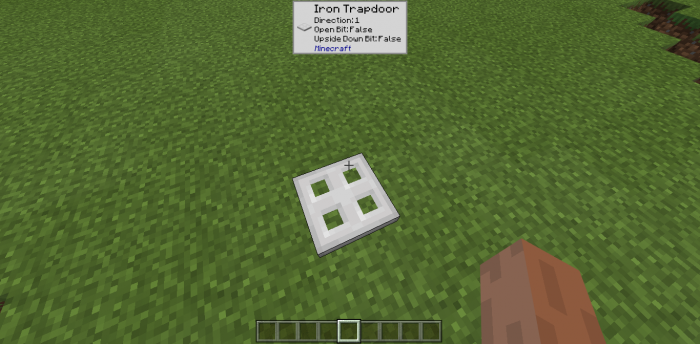
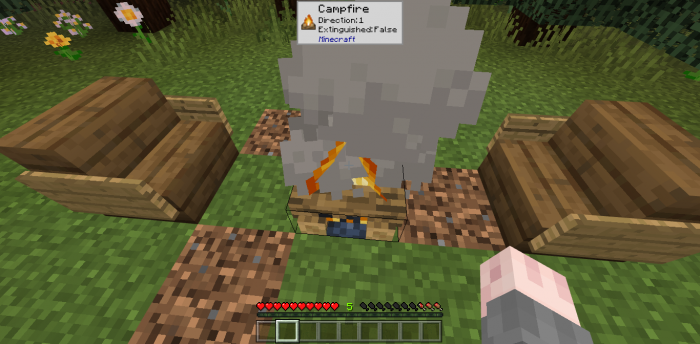
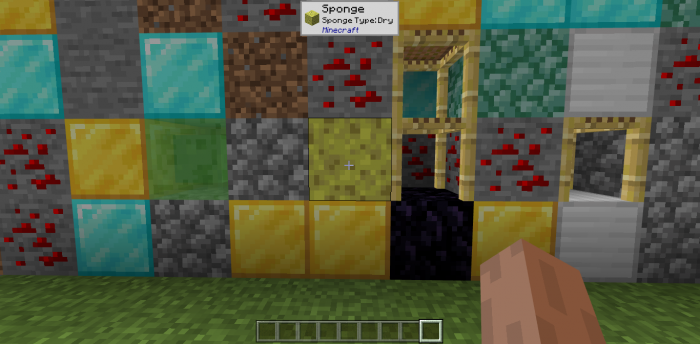
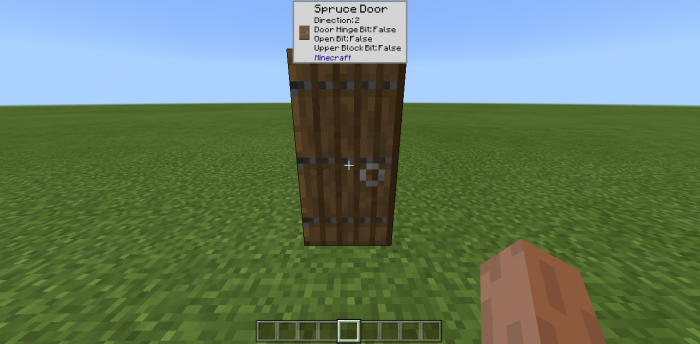
This add-on is a recreation of a popular Java Edition mod that introduces a small window which tells you all the information on the block you are currently looking at. 

Info

Ever wanted to see all the information about the block you are currently looking at? This add-on is for you! Whenever you point at a block, a small pop-up window will appear telling you what block it is, all of its blockstates, and what add-on it is from.
For Addon Creators

If you want WITS to display icons of your custom blocks, you have to follow these steps:

1. Add this snippet to your resource pack's manifest file: 

"capabilities": ["experimental_custom_ui"]

2. Create a folder named experimental_ui, and inside it, create a folder named blocks.

3. Take any picture you want of your block (recommended resolution: 32x32) and drop it into experimental_ui/blocks

Attribution

Block icons by Destruc7i0n

Installation

Before you download this addon, make sure you are on Windows 10 or on an Android with BlockLauncher installed.

1. Download the .mcaddon file

2. Open it

3. The add-on should start importing

Supported Minecraft versions

50 Responses

Comments 50
4.18 / 5 (28 votes)
1
You are the one true god, and I am saying this being Athiest. Thank you, my lord, for adding a direct download link.
Log in to Reply
when i download it on my windows 10 and import it, it says that the archive zip is not valid and the file pound is 0 octects
Log in to Reply
Guest-3355627867 May 19, 2020 at 6:37 am
Does ir works on mobs?
Log in to Reply
Guest-1715551489 May 16, 2020 at 4:47 am
Can u update it to 1.15?
Log in to Reply
Why it says download failed on android pls how to download
Log in to Reply
1
IOS does not support use, is there any way
Log in to Reply
Does this still work on 1.15?
Log in to Reply
No, it doesn't
Log in to Reply
Can this addons run on the server?
Log in to Reply
Eh muy buen addon script, Podriais hacer que sea un poco mas grande?
Log in to Reply
Windows 10 Installation Instructions
1. "Download the .mcaddon file"
2. "Open it" by double-clicking the file you just downloaded
3. Minecraft should launch and "the add-on should start importing"
4. Once the import is complete, select Play (At the Main Menu)
5. Either create a new world or edit an existing world.
6. On the left under Add-Ons, select Resource Packs
7. On the right under Available Resource Packs, select "What Is That Stuff" and then click the "+" icon beneath it.
8. Repeat steps 6 and 7 for "Behavior Packs"
9. On the left under "Edit Settings", select "Game"
10. On the right under "World Options", enable "Use Experimental Gameplay"
11. Click Play or Create to complete.
Log in to Reply
There is a bug it does not register when looking at the top of blocks
Log in to Reply
1
Just interact with the block (right click or left click it)
Log in to Reply
I tried opening my modded world (my version is 1.12 and i’m On iOS) with this addon but it said that my version dosen’t support scripts please tell me how to use this!
Log in to Reply
minecraft 1.12 for android and ios currently is unable to run scripts mojang are trying to implement this in 1.13 but it is in beta and this addon doesnot work in 1.13 although windows and xbox are able to run scripts at this time because its easy to implement into those versions
Log in to Reply
Dude me too but ur suppose to be on android wich is stupid cuz Apple is safe!
Log in to Reply
True gamers respect all platforms
Log in to Reply
For some reason it’s not working. I entered the behavior pack and rescource pack and it didn’t work. I have experimental gameplay in and everything. Do you think the 1.13 beta messed it up?
Log in to Reply
1.13 is currently broken as minecraft:load_ui is completely broken so you will have to wait for the next beta release.
Log in to Reply
Umm.. I downloaded this addon and everything was imported but its not showing up, im in windows 10 edition and I dont know how to run block launcher on pc.. so please help, thank you
Log in to Reply
do you put it in resource_pack or what??? and does it work with 1.1.4
Log in to Reply
Can you please give me a more detailed explanation of how to add custom blocks into the addon?
Log in to Reply
Any plans to support mobs as well? Would be cool to see their health in the tooltip in addition to their name and what add-on it's from
Log in to Reply
1
I have to activate the tricks or I activate them automatically? Please answer me
Log in to Reply
It Can't Support Android, I Wanna Tried But I Download Mcwin10 It Error
Log in to Reply
Everlasting_Luck May 12, 2019 at 1:04 am
Put 1.12 in the title geez iOS does not have it
Log in to Reply
BLAME IT ON THE NIGHT May 11, 2019 at 5:17 pm
Will it work with the new village and pillage (1.14) Update?
Log in to Reply
1
How would I install this using Block Launcher instead of normal Minecraft?
Log in to Reply
Use Minecraft Android as normal, although with the beta Minecraft 1.12 update and then download the pack and install it. Now download Blocklauncher and the open it and play.
To get Minecraft Beta please open this link, 'https://play.google.com/apps/testing/com.mojang.minecraftpe' and reinstall MC.
Log in to Reply
Nice script. But how could i disable the block state info?
Log in to Reply
I'm using v1.11.1 on Win10, should it work with this version?
Log in to Reply
Damn! Well thanks for the reply, it was frustrating the hell out of me.

I can't wait for similar addon that works on mine. Coming from Java MC, the Bedrock edition is seriously lacking customizability and I miss my in-game info!
Log in to Reply
What’s that stuff?
Log in to Reply
1
WAILA for Bedrock! Amazing! Thank you so much for your work!!
Log in to Reply
Plz how to open the script
Log in to Reply
1
What do you mean with "how to open it"?
Log in to Reply
This addon is really cool, but there aren't that many blocks that get displayed. I hope to see a day where all the items are displayed. Thanks for making this
Log in to Reply
its kinda buggy, I cant see the block im looking at if its from the top, and not all items are in, and it doesn't scale for 4k moniters but overall, really good
Log in to Reply
1
Try interacting with blocks for which the window doesn't appear
Log in to Reply
When you can’t play with script addons because iOS.
Log in to Reply
how to use it?
Log in to Reply