MCPE DL

Mods, Maps, Skins, Seeds, Texture Packs

Published on September 15, 2019 (Updated on September 15, 2019)

Porter (Survival Friendly) (Multi-Player Friendly) (Scripts)

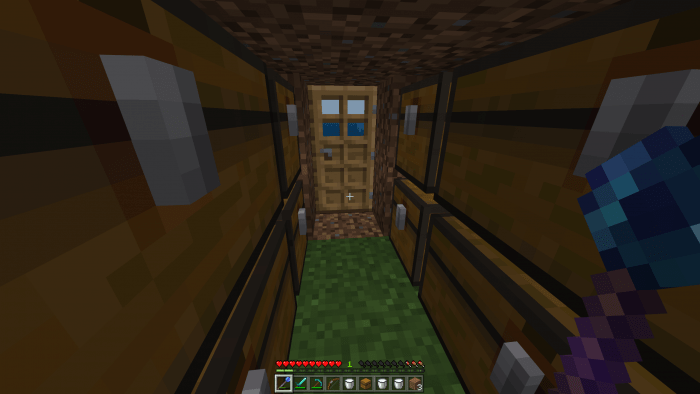
This add-on lets you swiftly switch between locations in your world. You can save and load up to 5 locations, and your they'll still be saved even after you restart the game!

Credits: reimarPB for the CSS file. TheDestruc7i0n, Cuteness, mflippy, 루아kr, and Miste for helping me create this add-on. :)

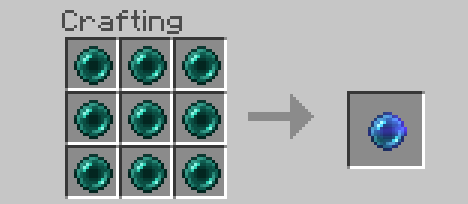
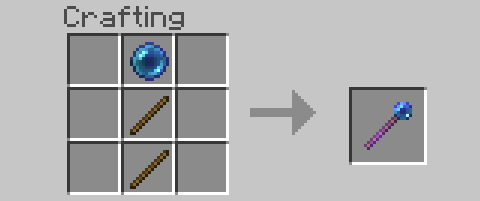
To craft a Porter, you must first craft a Compressed Ender Pearl by putting 9 regular Ender Pearls into a crafting table in the shape of a 3x3 square. Then using two stick and the Compressed Ender Pearl, you can craft your Porter like how you'd craft a shovel in a crafting table.

Important Note: Each players' Home slot is different. For example your 'Home 2' won't be the same as your friends'.
To open the UI, right click on any block while holding the Porter. Here's an example of when you probably should use it:

Follow me on Twitter to boost my ego.

Installation

1. Download Porter.mcaddon and open it.

2. In Minecaft, go to your world's settings by clicking the pencil tool next to the world you want to use this add-on on, and add the Porter resource pack and behavior pack.

3. Make sure 'Use Experimental Gameplay' is turned on in your world's settings.

Supported Minecraft versions

31 Responses

Comments 31
3 / 5 (11 votes)
Can this be updated to work for realms???
Log in to Reply
when i load a home it teleports me to 0,-2147483648,0 instead of 0,80,0
Log in to Reply
Wow So Cutee ! :D
Log in to Reply
1
Unfortunately dead on 1.12+
Log in to Reply
did not work for me even though i am on windows 10 :(
Log in to Reply
did not work for me even though i am on windows 10
Log in to Reply
Thank you SO MUCH for not using adfly! Keep up the good work :)
Log in to Reply
Doesn't work on xbox because it can't run scripts. :(
Log in to Reply
1
Hi, i think this addon was a great idea and it would be very popular, if all the devices supported scripts. Mine doesn't support scripts, but i can make it run with BlockLauncher. So, if you device does not support scripts you can use BlockLauncher and it will work. Keep the good job!
Log in to Reply
1
Hello creator, unfortunately this is a dead download link. The following always appears on Mediafire: 404. Could you fix this PLEASE?
Log in to Reply
Can’t you make it mcpack or mcaddon?
Log in to Reply
Dude It said mcaddon you dingle.....
Log in to Reply
It may be because you might be in a wrong version.
It only supports 1.12
Log in to Reply
No me 1.12 too but still not working your phone works cuz your phone supports script
Log in to Reply
It wouldnt work on my world
Log in to Reply
I wish Minecraft would allow scripts to Xbox and Android
Log in to Reply
MAKE IT NOT USE SCRIPTS PLEZ!!!!!
Log in to Reply
MaybeSchoolIsWorthYourTimeAfterAll September 21, 2019 at 10:36 pm
Scripts are the only way it works. What you're asking for is the equivalent of asking someone to make a car work without using a specialized set of mechanisms to make the wheels turn and thus move the car.
Log in to Reply
I can’t join my world
Log in to Reply
Hola puedes hacerlo addon por que ek scrip no permite usarlo en celulares pero de ahi excelente quisiera jugarlo en mi mundo
Log in to Reply
Well done, little addons can make you do a little server with little plugins wich is great. Keep it up cool addon :)d
Log in to Reply
lo puedes convertir en addon es qeu el scrip no permite que la gente que juega en celular se una a los mundo pls gracias de ahi excelente mod
Log in to Reply
Doesn’t download properly!
Log in to Reply
Hello, I wanted to report that I have an error I hope you can solve it or help me, it turns out that I give set to save the location and when I want to load it tells me that there is no saved location.
Log in to Reply
I tried importing the porter addon to minecraft and it said failed to import
Log in to Reply