MCPE DL

Mods, Maps, Skins, Seeds, Texture Packs

ReBuilt Shader

ReBuilt Shader, a shader pack rebuild from scratch, is the successor of the famous UltraMax Shader. Using new rendering methods to create a new stunning visuals at little performance cost.

Notes for Windows 10 player:
Since version 1.16.200, Windows 10 shader packs in general are no longer usable. This comes down to the changed rendering engine from the old method to the new Render Dragon. Future development of this shader pack is now in hold until Render Dragon can be modded. This shader is developed during version 1.16.40. The Windows 10 version of this version of the shader is already done. If you still want to experience this shader in Windows 10, consider searching up a Windows 10 Edition version manager like this one:
https://github.com/MCMrARM/mc-w10-version-launcher
Please read the instructions of this launcher before using.


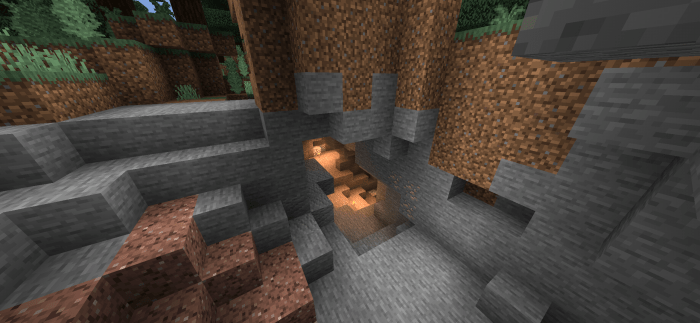
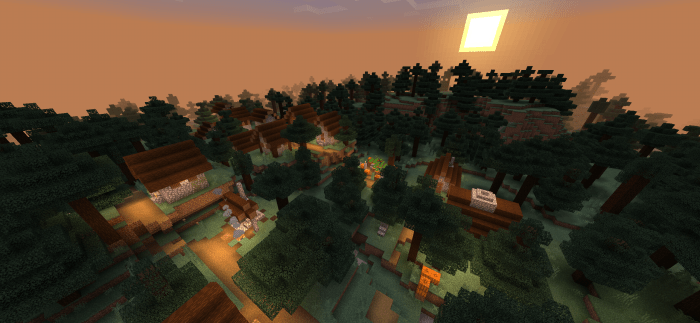
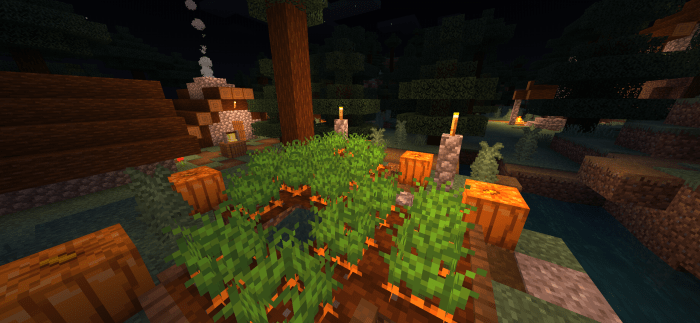
Screenshots of the shader.
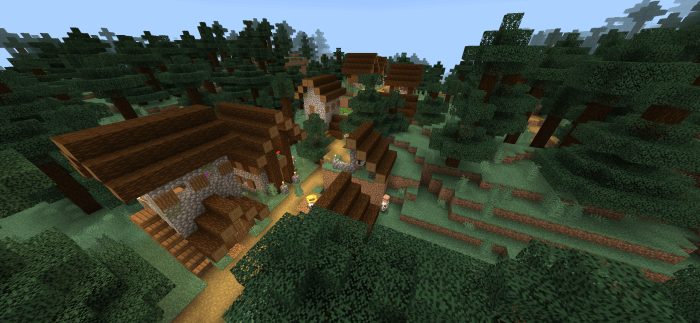
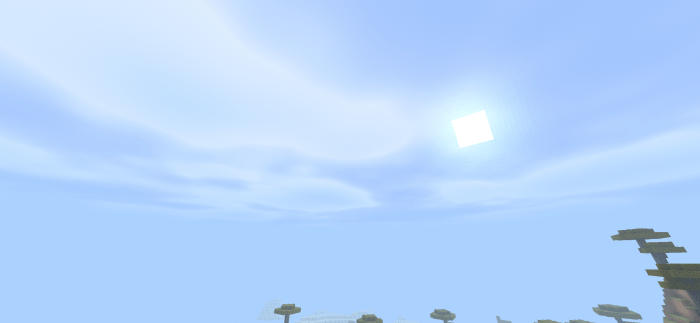
Introducing my first iteration with custom procedurally generated clouds.
Note: Requires you to turn off "Render Clouds" option in the video settings to disable the old cloud.
Warning for mobile players:
The clouds are super heavy. The shader has trimmed down the cloud quality by a significant amount just to make it playable. You can increase the quality of the clouds by editing this file:

ReBuilt Shader > shaders > glsl > sky.fragment
At line 10, increase the number defined there.

WARNING! Maximum usable value is 3. Values too high will freeze your game or your phone completely.


A few notes from me:
For those who wondered, my packs are direct downloads. No ad links, no link shorteners. I do Minecraft shaders as a hobby, not a job. There's not much else I asked or wanted from you apart from you enjoying and appreciating my work. Thank you for showing me your support on my projects.

Select version for changelog:

Changelog

1. Added procedurally generated custom clouds.
2. Improved sky coloring to support the new cloud.

Known issues:
No fog under water or lava, rendering them transparent.

Future plans:
Custom water waves, waving leaves.
Custom underwater colors.

Supported Minecraft versions

Resolutions

Installation Guides

95 Responses

Comments 95
4.23 / 5 (26 votes)
1
Can someone give me v1.0.2? I really cannot use v1.0.3 because of the clouds.

Thanks in advance.
Log in to Reply
1
I don't know how to code, but I was wondering what and where I would need to edit to make the clouds appear more rectangle?
Log in to Reply
1
wait does shaders work if we use mc laucher??
Log in to Reply
1
You gave up dude this is trash!!
Log in to Reply
1
For some reason, the shader does not work for me. I am on Windows 10 edition and on 1.16.210 and when I apply the shader to my game, it does not change anything at all. Can you help?
Log in to Reply
1
COME ON. Renderdragon released for win10 so every single goshdarn content creator is just giving up. RENDERDRAGON LITERALLY MEANS BETTER SHADERS ARE POSSIBLE. Yeah, win10 has RTX available, but SOME OF US DON'T WANT TO RISK WORLD CORRUPTION DUE TO HAVING TO GO INTO BETA JUST TO EXPERIENCE IT. >:(
Log in to Reply
1
They're not "giving up", my dude. It's literally not possible to make custom shaders for renderdragon yet. Gotta be patient and wait for the documentation and creator tools to come out.
Log in to Reply
1
This is indeed the case. Shaders for Windows 10 edition are now precompiled. The only way to have shaders with the new rendering engine is to precompile it as well. Unfortunately we don't have the tools nor the documentation to do so.

I really do need to clarify why shaders for Windows 10 is not possible in my statement of the pack up there...
Log in to Reply
1
its good but under water is so transparent and no fog pls fix
Log in to Reply
1
nice and simple shader
Log in to Reply
1
Hey dude :) so i have been having some problems. I tried opening the mcpack but it didnt work. It said its unable
M
Log in to Reply
1
The water seems a bit glitchy
It's too light (no depth fog)
Plus render is visible hence far off view show underground pathways
Can you tell me how to edit shader files so i can turn off wavy water on previous version , I'll be sticking to it
Log in to Reply
1
I love these shaders but in the latest version there is no fog (I activated them by editing the shaders but it did not work for me) and I can see completely underwater and the lanterns are very bright, outside of those problems they are the perfect shaders, if you can fix it. the water and flashlights or tell me how to do it would be very grateful, I do not want to play without these shaders.
Log in to Reply
1
Can you please tell me which files to edit to disable wave water (using last version)
Log in to Reply
1
Hey can i talk to you privately? I like the shaders by the way
Log in to Reply
1
Render dragon On All shaders is gone in one updates GGs
Log in to Reply
1
I've been waiting for that sand to be removed.
Log in to Reply
1
1
There's a bug for Windows 10 v1.0.2 when I go to my world the blocks start flashing like crazy almost like a glitch effect the textures get ruined and stuff can I get the link for the 1.0.1 version?
Log in to Reply
1
Never mind fixed it
Log in to Reply
1
do the trees turn white when close to them?!?!?
me has thAT if i put a two of a textures
Log in to Reply
1
Update your shader, It looks good...
Log in to Reply
1
this is so amazing!! i suggest that make a copy of this shader but without the wave animation because i see many players requesting, hehe they want just lighting and little stuffs, but this is great good job <3
Log in to Reply
1
I don't why people don't like the movement and water in Ultramax and this. It's very lovely. But what's the difference between this and Ultramax?
Log in to Reply
1
Can you improve the daylight lighting just like in the ultramax shader?thank you
Log in to Reply
1
it will lag a lot lol. this is actually the most laggiest thing on a good shader
Log in to Reply
1
FarhanDanyFachrullah September 07, 2020 at 4:04 am
Why always like Ultramax?? Found comment like these on almost all simple shaders.
Log in to Reply
1
Could you improve the blocks coloe, like in ultramax shader?
Log in to Reply
1
i like this shader but i dont like that water wave can you remove that please i really like your shader ❤️
Log in to Reply
1
Yeah, I wanted that, too
Log in to Reply
1
yes we don't need the waving water we just love the lighting
Log in to Reply
1
THANK U SO MUCH FINALLY A SHADER ONLY CHANGING THE LIGHTING/ADDING THE ENGINE LIGHTING
I know the water is changed a bit too with animations, but that doesnt matter, still dont laggs

I love this shaders i hope it stays how it is cause that's the onky shaders like them i searched for
Log in to Reply
Seems it doesn’t work for IOS. Crap. It looks so good thoughhhhh
Log in to Reply
Amazing shaders, i would love some shadows or animated grass
Log in to Reply
Worlds not loading with this in The game registers blocks are there but they’re all invisible along with the character.
Log in to Reply
how many people this is also my favorite shader and I love it a lot but it still bothers me a little the high brightness that some blocks like sand and quartz have, maybe for the next Could you lower the brightness a little? You also did a good job with the shaders, I love them a lot
Log in to Reply
My favorite shader! I don't like stupid half-realistic clouds and round sun. I was looking for something simple, and I finally found it! My only complaint is that bright blocks like white wool get overexposed (too bright). It just needs auto brightness.
Log in to Reply
It Daredevil. Won’t import. I downloaded the file and tried to import but I said import failed. Why? Please respond. - Daredevil
Log in to Reply
I didn't notice a change at all besides the wavy water witch is cool I even compared it to vanilla Minecraft and i don't see a differents. im on windows 10.
Log in to Reply
It wouldn't load in it. Failed to import, im on win 10 does this work on this version. please help!
Log in to Reply
1
Amazing! But please change water.
Log in to Reply
Hey just wondering, what software do you use to create shaders for Minecraft Bedrock Edition? I want to make my own shader, and see what I can do. Thanks!
Log in to Reply
Looks like a cool shader. Will get soon. Will respond about how I think of it when i get it. - Daredevil ?
Log in to Reply
It’s not downloading. Tell me why please
Log in to Reply
This Shadder is amazing. Please consider adding shadows, and also making the water waving a little bit more subtle. Thanks for making it for Windows 10 :)
Log in to Reply
It does work on Pocket edition right?
Log in to Reply
Yes, it works for both mobile and PC Bedrock.
Log in to Reply
1
Nice Shaders,Works Great in my phone and also Unofficial Linux MC:Bedrock
also i love to see the fact that the torchlight isnt too orange or red but maybe i will edit it slightly yellow later xD,anyway i love it 100/10
Log in to Reply
I think the download link is broken, it downloads a tiny .bin file, and it doesn't work.
Log in to Reply
1
thanks for the update to win 10. add more shadow
Log in to Reply
This shader is perfect for my phone. I have a phone that lags when I use ESBE 2G. This doesn't lag and it looks great. Only thing I ask is to add a small monochromatic effect. That's all.
Log in to Reply
Add shadow and water wave please..

Please add i cant make shaders,if you cant it's ok :)


Soory if my english is bad..
Log in to Reply
go download ESBE 2G, it runs better, has Win10 support, and looks better.


ReBuilt is nice and all, but it doesn't even compare to the might of ESBE 2G
Log in to Reply
Eh, ESBE is too bright in my opinion.
Log in to Reply
ESBE is straight up ugly
Log in to Reply
It laggy
.
.
.
PoTatO pHonE,lOl
Log in to Reply
It says failed to upload. It’s always saying that the package has an unknown name so it won’t show.
Log in to Reply
every time a new shader comes out it doesn't support windows 10, is it hard to develop for windows 10?
Log in to Reply
i've heard its because most shader developers learn glsl before they learn hlsl (hlsl is what windows and xbox use, whereas glsl is what mobile devices use)
Log in to Reply
1
Metal Sonic Playz June 13, 2020 at 5:50 am
Nice job gengHAr

But better work on more effort during day
Log in to Reply
1
it run poorly But still gives a nice light(the water is out of place because it is just the old texture wiggling like a piece paper fluttering in a strange way)


it is so vanilla but still run poorly how is this possible
Log in to Reply
1
I forgot to rate it
Log in to Reply
Issue:
Either remove the choppy water wave or fix it.
Log in to Reply
I don't understand all the hate, this is a great shader pack and does exactly what it says; "stunning visuals at little performance cost." Read what it says before you complain about the pack.
Log in to Reply
1
Hate for some reason Windows 10 users with a powerful device hateing on a low end shader
ْ
ْ
ْ
but really this shader still lag even though it is so vanilla
Log in to Reply
1
What device are you currently using?
Log in to Reply
1
TryHardJibs/ MahDestiny June 12, 2020 at 6:40 pm
Exactly. This shader is supposed to be for people who have low-end devices and want to go easy on their Minecraft's frame rate.
Log in to Reply
Vi la iluminación y me encantó el sombreador y si bien faltan sombras y eso es hermoso
Log in to Reply
No sean malos y no comenten cosas así este sombreado es maravilloso ee hecho es lo que avía buscado y al verlo creí que solo estaría para RTX y al ver qué es para android me encantó gracias
Log in to Reply
This shader looks exactly like vanilla minecraft. You need shadows, waving water, nice lightning, better fog, that is IF you're ACTUALLY trying to make a SHADER
Log in to Reply
dude listen even though this does not look like a shader it still is a shader just an enhanced version of the vanilla. what ever shaders you saw where kinda out of the line one but this one is good. but question why are even looking at this in the first place
Log in to Reply
shader did what said (Be nice, it's from scratch
ٖ
ٖ
ٖ
I am sure that someone will build on it
Log in to Reply
Shaders can be anything from simple ligthing changes to full on shadows and crazy things like god rays. This is for bedrock edition and we are limited in what we can do. So chill out
Go play with RTX if you want
Log in to Reply
this shader looks bad, runs poorly, and doesn't even support windows 10


just get ESBE 2G, it is way better smh
Log in to Reply
Thats your opinion, but what do you expect from bedrock edition? we are working with what we got. Windows 10 support will come along anyway. this just released
Log in to Reply
considering for win10 we have RTX I think this guy has a valid point, ESBE and RTX combo looks better than this..
Log in to Reply
no win10 support? next!
Log in to Reply
Listen dude, I am the first one commenting here, Shader is pretty good. BUT PLEASE ADD WINDOWS 10 FASTER
Log in to Reply
Why would you play on Minecraft Bedrock, I thought Java have tons of mod and shader for you to choose
Log in to Reply
1
TryHardJibs/ MahDestiny June 12, 2020 at 6:32 pm
Oh, lordy, why do people keep confusing Bedrock Windows 10 with Java? These Minecraft PC platforms are very different from each other: Bedrock Windows 10 has almost every feature that mobile and console have, and players of MCBE Windows 10 are in the same community as Pocket and console; Java has its own community, cost extra money for people who have Bedrock on any platform, and has many features that Windows 10, console, and mobile Minecrafters do not have! By the way, this website is MAINLY dedicated to BEDROCK PLAYERS and not JAVA PLAYERS, who have their own community site at Planet Minecraft.
So, in short, please stop confusing Windows 10 with Java and consider the former as part of the Bedrock family.
btw genghar's shaders are epic
Log in to Reply
What does it do
Log in to Reply
Does it work for xbox?
Log in to Reply