
MCPE DL

Mods, Maps, Skins, Seeds, Texture Packs

Published on March 22, 2019 (Updated on July 04, 2020)

Damage Indicators Script (Updated)

An addon which takes advantage of the new Scripting API to provide damage indicators for mobs, presented at the top left of your screen. It is fully multiplayer compatible, and will not intrude on your Minecraft experience.

What?

This script will show a health bar for mobs/players you aim/hover on.
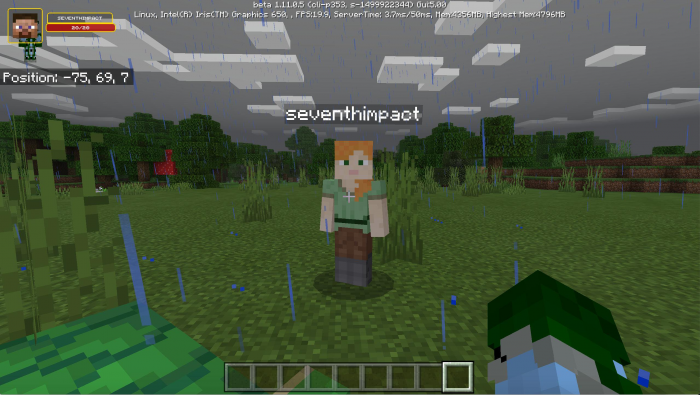

There's a small demo of this in action on my Twitter: https://twitter.com/TheDestruc7i0n/status/1105235740533772289

Features

  • Will show the name of the entity if available, otherwise the entity's identifier
  • Works on Multiplayer servers with the behaviour pack installed
  • Automatically resizes to fit multiple screen sizes
  • Will work on versions 1.10+ on Windows 10 (Once BlockLauncher supports unlocking scripting again, Android should be supported)

How?

This is using the new Scripting functionality available in the latest bedrock versions, and specifically takes advantage of those added in the 1.10 update.

Notes

  • If you see a picture of my Minecraft skin face in the preview area, that means that the entity you're looking at isn't one that I added to my list, and you'll see my wonderful face instead! :)
  • This will not show the image of the faces of other players.
  • Developer? Take a look at the server script for some details about the code (scroll down a bit)...

Custom Entity Support

  • Starting with addon v1.1.0 you can add images for your own entities.
  • In the resource pack folder for this addon, go into the folder experimental_ui/custom and place .png files in there which are the id of the entity you wish to add. For example, with an entity of the id dinosaurs:trex (this is the id used in the summon command) the file would be trex.png.

The Scripting API is still an experimental feature. I do not recommend using it in your primary survival world.

Select version for changelog:

Changelog
v1.1.0
  • Updated for 1.16 entities including those missed since 1.12
  • You can now add custom images for your custom entities

Installation

Ensure that:
  1. You are using version 1.10+ on a supported platform (Windows 10)
  2. You have enabled Experimental Gameplay

Supported Minecraft versions

89 Responses

Comments 89
3.94 / 5 (32 votes)
1
About complements that take advantage of scripts... it is possible to create things like chests, craftng tables, And other things that are different? I always wanted to test something like this ?
Log in to Reply
1
Can I use your addon an my modpack
Log in to Reply
1
Can you make for minecraft android v1.16.40
Log in to Reply
1
Thanks for making it Mediafire and not anything else this is how all creators should make it so it is not so sketchy to download anything.
Log in to Reply
1
Sorry, I misspoke I meant some creators make it so sketchy to download anything.
Log in to Reply
TYSM for no adfly i once got a virus from adfly!
Log in to Reply
This is a resource pack not a behavior pack, correct?
Log in to Reply
it's a scrip, only for Win10
Log in to Reply
Great job, but can your change it to the right corner, the paper doll is covered. It might just be me, but I like to be able to see it1
Log in to Reply
Pls make a tutorial on how to add custom images
Log in to Reply
Could u make a script that show you location on the top right of the screen
Log in to Reply
Por qué no activas las coordenadas y ya
Log in to Reply
update please or are you waiting for the nether update??
Log in to Reply
can you updated this addons to 1.14 because 1.14 added new mob by mojang!!
Log in to Reply
can you updated this addons to 1.14 because 1.14 added mew mob by mojang
Log in to Reply
WHY THIS DONT WORK ON IOS!?
But thanks because finally something on MCPEDL isnt on f%$@#!$ addfly!
And i am sure you will fix that!
And thats because i give 5 stars :-)
Log in to Reply
Adf.ly is the correct site,wait 5 seconds then click skip ad.it will send u to MediaFire.dont be stupid ok
Log in to Reply
1
No you don't be stupid adfly takes forever and also asks you to put notifications on.
Log in to Reply
It just takes five seconds and you could just block the site after? it's not a big issue
Log in to Reply
1
The reason why it doesn’t work on iOS is because iOS doesn’t support scripting yet, I don’t know if this Apple or Mojang, but it won’t work
Log in to Reply
Because phones don't support that. Just buy a pc.
Log in to Reply
Update 1.13 please and added fox !!!
Log in to Reply
What folder does it go in on Xbox one. I put it in the behavior packs but is there another one?
Log in to Reply
Open the folder after renaming .zip at the end and put damage_indicator_b in behavior
and
damage_indicator_r in resource
Log in to Reply
1
also pls make it work without experimental mode been on i cant use it on serverz
Log in to Reply
1
does this work with mobs?
Log in to Reply
Its saying that I must have other pack for it to work, and I followed the instructions. Can you please guide me through?
Log in to Reply
This doesn’t work on IOS!!!!! WHYYYYYYY!!! P.S. do you know when 1.12 is coming out on IOS?
Log in to Reply
1
tahts dont working
Log in to Reply
Is there anywhere for me to report bugs?
When I hover over a wandering villager I get script warnings. Just letting you know if you didn't already.
Other than that I have not found any problems with your addon. However will be able to make a icon for your own mobs, like how WITS has made the ability to add blocks?
Log in to Reply
This is really awesome!
I have an idea, you should make mobs of popular add-ons have their own icon if it's possible.
Log in to Reply
can u use it with multiplayer servers?
Log in to Reply
Not epic, it dose not work on iOS>:(
Log in to Reply
Any chance of a update for for windows 10 version 1.12.02 beta?
Log in to Reply
Thank You for not using adfly
Log in to Reply
What is the command to activate
Log in to Reply
Cual es el comando que hay que usar para activar esto? porfavor responde
Log in to Reply
How to install it to BDS ?
Log in to Reply
Is you a developer of Shulker Discord bot?
btw, its really good
Log in to Reply
Is this working on console?
Log in to Reply
No, only Win10 and Android with Blocklauncher
Log in to Reply
It does work on the Xbox one. Don’t listen to half the people here. They don’t know who to install ufo transfer from the Xbox one store and add a file to the Minecraft path file.
Log in to Reply
What folder do you put it in
Log in to Reply
1
Game also crashes when looking at ghast fireballs. (Win 10, 1.10.0)
Log in to Reply
1
Game crashes after looking at skulls that shoots Wither.
Log in to Reply
1
Seems to be affecting entities that are spawned by an entity... Updated the url, please re-download. Terribly sorry about the crashes.
Log in to Reply
That's Ok :) Thank you for the fix.
Log in to Reply
Great idea, but it says my device can’t run scripts even though I’m in 1.10. I play on an iPhone SE.
Log in to Reply
Only Windows 10 edition currently supports scripts officially. If you have a Android device you can also use Blocklauncher to run them, but right now they don't work anywhere else. I'm sure they'll add full support eventually.
Log in to Reply
now it crashes when its an explosion
Log in to Reply
thank you so much ive been crashing when i look at cristyls
Log in to Reply
I use windows 10 on the 1.11.5 beta and I can't seem to see the gui. Does anyone think that they can help?
Four stars: I think it would be a great addon
Log in to Reply
Windows 10 guis dont work for me either
Log in to Reply
maybe you can add compatibility with other popular addons in the future
Log in to Reply
Ruth Angel A Melchot March 23, 2019 at 8:52 am
Thank You!
Log in to Reply
love it it works in my computer but... i want you to add a damage indicter to the ones that are moded like addons
Log in to Reply
You can put the zip
Log in to Reply
1
Can you please fix the crash bug when i see a ender crystal
Log in to Reply
So if i want to make costum entities, i have to put the .png image?
Log in to Reply
That mod works well but when i look at ender crystal it crashes minecraft
Log in to Reply
1
That mod works well but it crashes minecraft when i look at the ender crystal
Log in to Reply
1
This has been fixed in the 1.0.1 version!
Log in to Reply
This has been fixed in 1.0.1
Log in to Reply
Is there a zip file for this script?
Log in to Reply
Does this work for IOS
Log in to Reply
Its not showing for me.

I'm giving it 3 stars because I'm sure its a good add on.
Log in to Reply
I am having the same problem
Log in to Reply
1
Have you enabled experimental gameplay?
Log in to Reply
1
Which device are you using? When you load up the world, do you see any red text in the chat? What entity are you looking at?
Log in to Reply
I say stupid because of script
Log in to Reply
When I was testing this this script I looked at llama and quickly at another llama. Then the game crashed. Please fix. Thank you :)
Log in to Reply
1
I have done similar tests multiple times without any sort of crashing, would you care to share some information about which device and version you're on, and if there were any other entities nearby when you were looking at this different mobs?
Log in to Reply
Have you tried to tie the llamas to the fence? Because I tried to do it three times and every time the game crashed. (Windows 10, version 1.10.0)
Log in to Reply
1
The game crashes anytime when I lash an animal to the fence. I think the script is getting confused when I look at the lash on the fence or when looked at the lash itself (I mean that one which is loose).
Log in to Reply
1
Yeah it's for 100% caused by the leash knot. I tried to summon it by commands and then look at it. The game just crashed.
Log in to Reply
1
Yeah, there is a bug with these entities and the Scripting API... Pushed out a hotfix in version 1.0.1 that addresses them!
Log in to Reply
Yeah, there is a bug in the Scripting Engine regarding some entities... I’ve pushed a hotfix (1.0.1) to counteract that!
Log in to Reply
1
MatthewDoesWhateverYT March 22, 2019 at 2:19 pm
yo, this is epic, thank yo so! :D
Log in to Reply