

This mod is the ultimate tool for more efficient building in Minecraft. It's limited to Android use only as it requires a third-party launcher such as BlockLauncher to run. The best thing about this mod is that it minimizes the need of using text commands. Instead you will use wooden tools in-game to make most of the world editing.
Creator: Jakub, GitHub Page
 Find the location you want to move or copy the selection. Then tap on the ground with the tool (Wooden Shovel = Copy, Wooden Hoe = Move) to move or copy the selection to the new area.
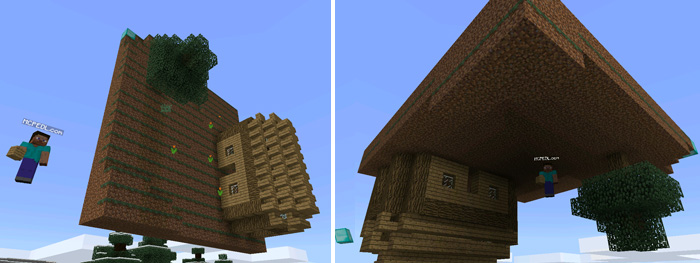
 You can rotate a selection on any of the three axis with the Wooden Axe.
 The Wooden Pickaxe can be used for filling an area with a certain block. In this case, I used the Wooden Pickaxe to select the house. The third determines the replacement block.
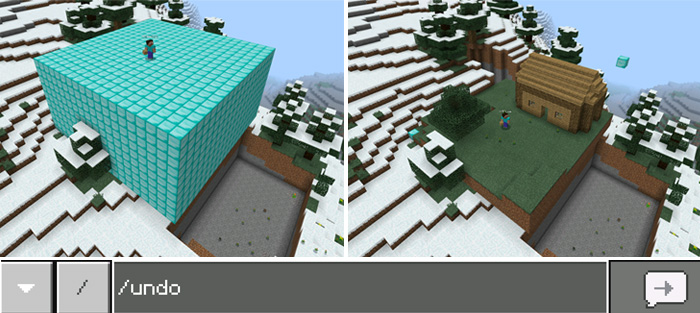
You can always undo the most recent WoodEdit operation by using the following text command: /undo
The Wooden Pickaxe can be used for filling an area with a certain block. In this case, I used the Wooden Pickaxe to select the house. The third determines the replacement block.
You can always undo the most recent WoodEdit operation by using the following text command: /undo
 That's some of the main features for this mod. If you would like to learn more about the features then make sure to check out the official GitHub page here.
How does it work?
There are several different tools which you can use for modifying the world.- Stick - Select cuboids
- Wooden Shovel - Copy selected cuboid to a new area
- Wooden Hoe - Move selected cuboid to a new area
- Wooden Axe - Rotate selected cuboid around one of three axis
- Fishing Rod - Replace certain block to another inside selected cuboid
- Wooden Sword - Fill selected cuboid with air
- Wooden Pickaxe - Fill selected cuboid with certain block
- /undo - Undo last WoodEdit operation
- /save [filename] - Save selected cuboid into a local file
- /load [filename] - Load selected local file into clipboard for further copy / rotate operations
Find the location you want to move or copy the selection. Then tap on the ground with the tool (Wooden Shovel = Copy, Wooden Hoe = Move) to move or copy the selection to the new area.
You can rotate a selection on any of the three axis with the Wooden Axe.
The Wooden Pickaxe can be used for filling an area with a certain block. In this case, I used the Wooden Pickaxe to select the house. The third determines the replacement block.
You can always undo the most recent WoodEdit operation by using the following text command: /undo
That's some of the main features for this mod. If you would like to learn more about the features then make sure to check out the official GitHub page here.


44 Responses
Love this mod alots
Also emerald jaguar how did you record it?
https://youtu.be/3olM0BlAjZc
I did not know till today, that my mod is described here. It's cool to know, that many of You like it. So i decided to prepare a quick release, that fixes some bugs mentioned in comments above.
- "replace tool (fishing rod)" had a bug and did not work correctly - fixed.
- "load" command did not work - fixed. But you should look at the first line of the script - "savePath" variable holds a folder name where files will be stored - verify that it is right place for You.
- "/replace [from] [to]" - new text command added for replace block in selection. "[from]" and "[to]" parameters should be a correct block ids, for example: "/replace 1 2"
Next step for me is to fix rotation bugs - especially stairs are not rotated correctly...
I did not know till today, that my mod is described here. It's cool to know, that many of You like it. So i decided to prepare a quick release, that fixes some bugs mentioned in comments above.
- "replace tool (fishing rod)" had a bug and did not work correctly - fixed.
- "load" command did not work - fixed. But you should look at the first line of the script - "savePath" variable holds a folder name where files will be stored - verify that it is right place for You.
- "/replace [from] [to]" - new text command added for replace block in selection. "[from]" and "[to]" parameters should be a correct block ids, for example: "/replace 1 2"
Next step for me is to fix rotation bugs - especially stairs are not rotated correctly...
PEOPLE.
Here's a quick lesson:
Add-ond are available for iOS because they are a part of Minecraft, and they only either make hidden items accessible, retexture items/entities, and change their behaviors. ADD-ONS ARE VERY LIMITED, SO THIS ISN'T A POSSIBLE ADD-ON! That's why it's a MOD. Mods can add new items and a TON of other features that an add-on can't do.
Hopefully that clears some stuff up.
Phew.
Comon minecraft LET MODS
am I right
That I WoodEdit a lot using this tool.
pls dont kill me