MCPE DL

Mods, Maps, Skins, Seeds, Texture Packs

Published on February 18, 2019 (Updated on November 25, 2020)

[Remake/Concept] Vanilla Deluxe: Old Days UI

Important: Read carefully before download and use!

UI rewritten from scratch by: @CrisXolt.

From Win10 user, for PE users ;D

RP description:

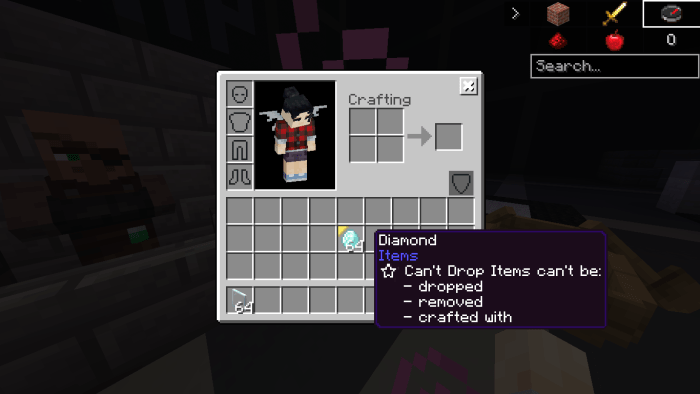
An UI Add-on resource pack that brings back some old pocket/desktop UI designs from 2015 (Alpha 0.11.0-0.14-0) for current version of Minecraft Bedrock (Before MC PE/Win10E)!

Some UI screens will be styled, others will be 75% accurate about previous UI design.

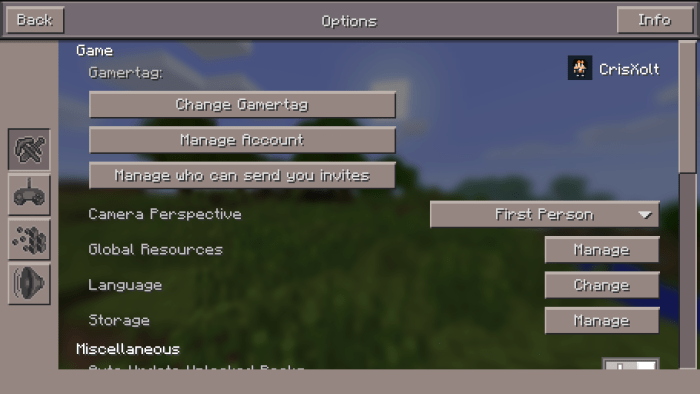
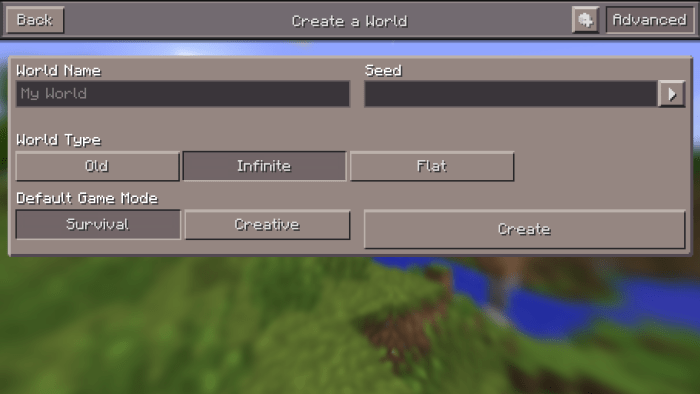
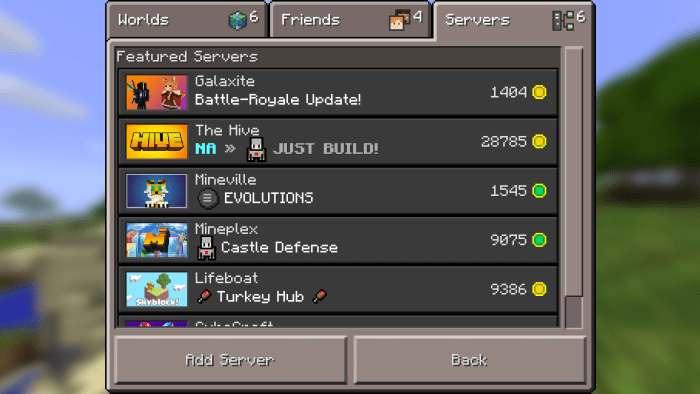
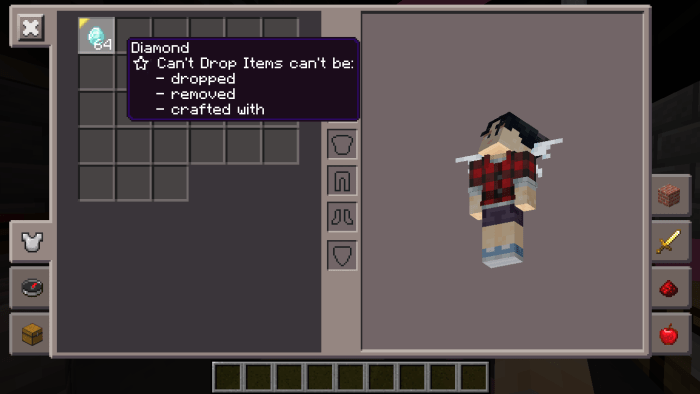
Screenshots:
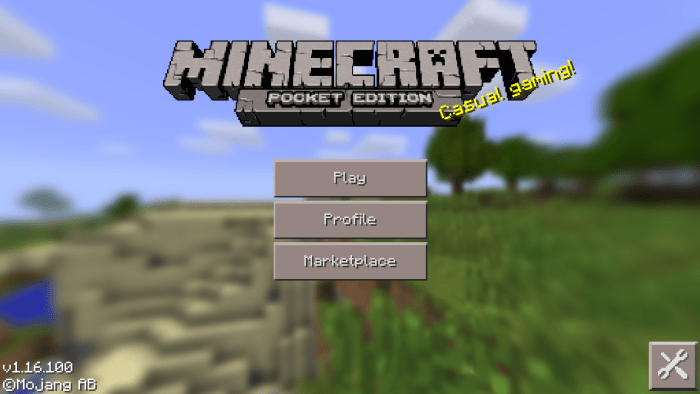


All Features:

  • Start screen
  • Play screen
  • Add external server screen
  • World template screen
  • Create and edit world screen
  • Settings screen
  • HUD screen
  • Anvil
  • Beacon
  • Brewing Stand
  • Chest
  • Enchanting Table
  • Furnace
  • Horse
  • Inventory, Crafting and Creative Pocket
  • Loom
  • Redstone
  • Trade
  • Chat screen
  • Pause screen
  • Skin picker screen
  • Start screen Desktop
  • Play screen Desktop
  • Inventory screens Desktop

Coming soon!

The 2011 Edition! (Release date: 2021)

Another version of Old Days UI, but with the UI design from Alpha 0.1 to Alpha 0.7. Very nostalgic for very veteran players. ;D

Terms of use:

You're allowed to:

  • Make review about this pack, as long as you credit me as "@CrisXolt". And put original download link in description (This MCPEDL forum post).

You're NOT allowed to:

  • Make customized APK/APPX and monetized content (pirate modifications), no one will have the permission.
  • Steal my .JSON and .UIDX file code claiming this work as your, no one will have the permission. Specially not modify/erase the text in the first line code in each .json file. (Example text: //File Made/Modified by @CrisXolt).
  • Repost this resource pack made by me in other pages, especially with adf.ly hide link.

Special Thanks:

SirZeus for original ideas!

Before installing:

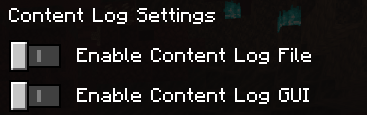
Make sure you have these options disabled, by 2021 I will bring updates without errors for those who have this enabled.
Important note:

Another thing is that this resource pack is not compatible with others with modified UI, not even the VDX: Java UI.

And how do I deactivate this add-on?
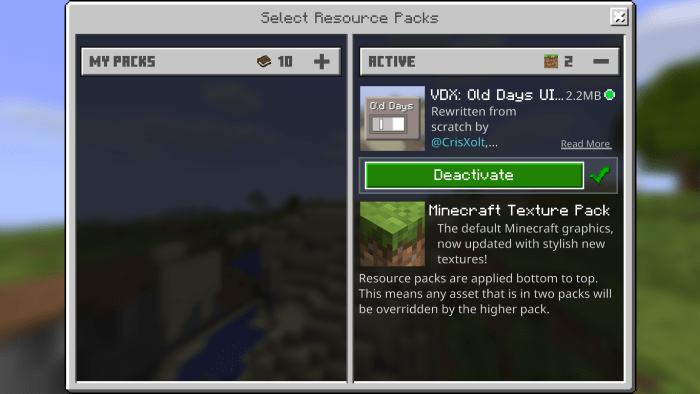
In case you don't remember how you used resource packs in Alpha 0.15.0. It's easy, just go to options and click the button where it says: "Manage".
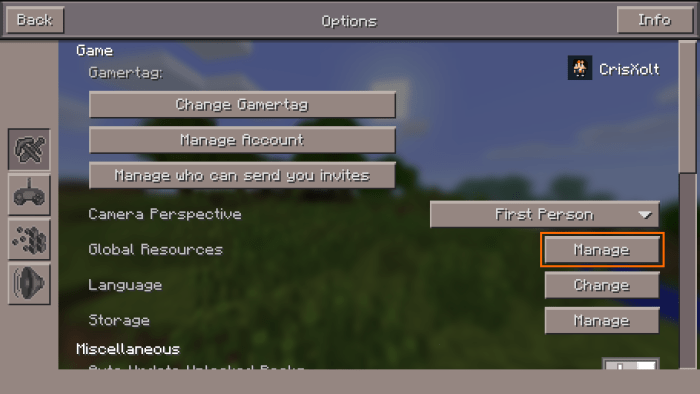

And then this screen comes out and you can deactivate this. That's all! ;D

Final note:

Seriously, those default .json UI files and old UI design is made originally by Mojang, actually are modified and remade by me for entertainment purposes.

Just enjoy and good luck ;D.

Select version for changelog:

Changelog

Updated the forum as long as there are no typos. So, it's not a big deal, but...

I also did a small update only bug fixes and added the missing things. ;D

v2.2.1

  • Added "Only Allow Trusted Skins" toggle option.
  • Added "Storage Management" screen.
  • The Boss Bar issue in HUD has been fixed.

Installation

  1. First wait some seconds and then click on "Continue". Note: I'm sorry, but I do this to make sure I get support and continue to update my projects. D; But, if you really don't like AD, I suggest you visit my twitter @CrisXolt, there will be direct links in the following tweet.
  2. After this, the Mediafire page will appear, click the download green button to get the file.
  3. Open .mcpack to launch Minecraft and import resource pack automatically.
  4. Settings > Global Resources > Apply the resource pack.
  5. Enjoy with old style of Pocket or Desktop UI! ;D

Supported Minecraft versions

Resolutions

Installation Guides

143 Responses

Comments 143
4.5 / 5 (72 votes)
1
I love this addon but ONE question.................can you please change it to have to og MATTIS crafting interface please
Log in to Reply
1
At the bottom of the description of this pack, the creator says he plans to make a 2011 edition this year
Log in to Reply
1
Awesome pack I remember it looking exactly like that but do you know exactly when your 2011 edition is coming out(you said it would come in 2021 but could you possibly be more specific please thank you 😊)
Log in to Reply
1
i love it
sometimes i feel like the most usable Mcpe ui is on 1.0 version
and the most usable classic ui is the pre 1.2.13 or 1.0 to 1.2.10
Log in to Reply
1
TQ VERY MUCH FOR READING MY REPORT!! IM SO PROUD OF U ALSO WITH THE VERSION 2.2.1!!
Log in to Reply
1
It smells of pure nostalgia.
Log in to Reply
1
N I C E. But can u add "storage" and 'allow trusted skins" button? pls, i really need those... "storage" help me to delete texture pack, behaivour pack, worlds and even chahce! my skin dont load if "allow trusted skins" is off on server.. hope u update that...
Log in to Reply
1
Srry, i mean "only allow trusted skins" make my skin dosent load if its turn on.. so i must turn it off.. also, pls.. where is the invite button? I cant invite friends XD i am using Windows 10
Log in to Reply
1
Thanks for reporting, I am solving right now.
Log in to Reply
1
Thx, for reading my report..
Log in to Reply
1
Very nice Gui =) ,but i miss the Gui from the Console edition :( can you please make a Texture pack with the gui?
Log in to Reply
1
Thanks, this texture-pack is so cool! Its on-point!
Log in to Reply
1
Hello @CrisXolt, I came her to remind you that the console edition players are very mad that you're working on the other UI packs instead of the Project 4JD UI. But besides the point, can we at least finally have a Beta version of the Project 4JD UI? Because most of the screenshots on the development of Project 4JD look finished already and now is the perfect time for the Beta to release. The only way to calm the console edition players down is to release the beta of the Project 4JD UI.
Log in to Reply
1
Can u make a another Inventory screens dekstop ui pls
Log in to Reply
1
Can you make a another inventoiry ui u give in the last screnshot pls
Log in to Reply
1
Troubles with boss/raid healthbar.
Log in to Reply
1
I have already solved it, I have updated the file with the same link that you just downloaded, I recommend that you go to my twitter and check the latest tweets with direct DL. ;)
Log in to Reply
1
Troubles with boss/raid healthbar. Its Purple-and-black
Log in to Reply
1
You are a hero!
Log in to Reply
1
Guys go to your file manager>games>com.mojang>resourcepacks> then delete the pack file if you want to take off the pack
Log in to Reply
1
Hi, just a feedback, i cannot make worlds and servers, when i make one it takes ages to load, (well its immortal bc it does not load) can you pls fix it, will be happy, like the addon?
Log in to Reply
1
nvm I got it off
Log in to Reply
1
how do you take it off :(
Log in to Reply
1
Reinstall minecraft
Log in to Reply
1
Go to the resource packs column and deactivate the resource pack which is being used
Log in to Reply
1
HOW DO YOU TAKE IT OFFFF IM CRYING
Log in to Reply
1
Damn... nostalgia be hittin me hard
Log in to Reply
1
This is crazy and very nostalgic to look at, but I am waiting for a 2011 pack just to feel that I am playing Minecraft for the first time again
Log in to Reply
1
Use the classicbe shader. It looks like the first versions of minecraft
Log in to Reply
Also before you people say 'its not updated in 2020 so its broken' only the post isn't updated. Only the file of the .MCPACK is updated.
Log in to Reply
Hi this does not fit my iPad mini 5th generation
Log in to Reply
When will the 2011 edition be released?
Log in to Reply
I am also an '11er.
Log in to Reply
I cant play Minecraft any more 0 stars out of 5
Log in to Reply
this better be a joke
Log in to Reply
I can't rename items i cant pick stuff up from the anvil, help pls
Log in to Reply
I tried using anvil, but it won't let me pick the renamed item up
Log in to Reply
Are u blind? You can do MCW10 UI on MCPE
Log in to Reply
Are you blind? You just posted the same message 2 times!
Log in to Reply
Are u blind? You can do Win10 UI in MCPE
Log in to Reply
Could you plz add the old villager trading screen?
Log in to Reply
How to return to the original?
Log in to Reply
it says windows 10 edition
Log in to Reply
1
How to remove? Pls help
Log in to Reply
It says windows 10 edition if you're using windows 10 edition. It shows pocket edition if you're on a mobile device.
Log in to Reply
how do i change my packs in the settings?
Log in to Reply
go to options and tap manage next to global resources and turn it on
Log in to Reply
How do I download this on an iPad? The download link is almost always a failure and I keep trying every week but it’s still a Mac download link. Please fix this, I used this for the longest time and I still want to use it.
Log in to Reply
It doesnt work with safari, it only works with chrome or google
Log in to Reply
can we use another addons in this?
Log in to Reply
Now all we need is an add on that gets rid of a bunch of stuff and we’ll be perfect ?
Log in to Reply
Amazing! Everything is the way I think should be! Everything is classic! Love it!
Log in to Reply
1
I forgot to give you a note: To deactivate this resource pack. First go to settings, in the game tab there you will see the "change" button below the perspective dropdown button, click on it and the resource packs screen will appear, select it and deactivate it, that's all. ;D
Log in to Reply
1
I was wrong, it was "manage" button, not "change" button. Sorry! >_<
Log in to Reply
1
I LOVE this pack and I have for a while but it does need to be updated.

Updates needed:
Minecraft title
New skin/profile settings
Pause button
Chat button
Movement buttons
Log in to Reply
I can't get rid of it my Minecraft is ruined forever
Log in to Reply
What is it with ignorant people like you. All you have to do is go into settings and click the button that says "Manage" next to the text that says texture packs. So before you go and post comments like this, make sure you know what your talking about.
Log in to Reply
1
There is no button named managed of mine
Log in to Reply
How Do I Resize The Pack.
I’m Using A IOS 11 iPad And When I Enable The Pack The x Button (Used To Go Back) Is Cut Off
(But Still Like The Pack) ;)
Log in to Reply
It’s blocked my stupid google:(
Log in to Reply
I have seen alot of people having the 0.7.0 gui so im really confused
Log in to Reply
How can i get the classic pocket edition (2011) ui? it is coming soon???
Log in to Reply
It says it's coming soon.
Log in to Reply
Can you make the movement button like the 0.1.0 movement button
Log in to Reply
Uh, i cant use control options.
Log in to Reply
Uh, i cant use control options D:
Log in to Reply
please update the console edition ui
Log in to Reply
I don't know hot get rid of texture pack???????
Log in to Reply
Same my minecraft is ruined even if I delete minecraft
Log in to Reply
Wow the mod is amazing can you make a Xbox remake
Log in to Reply
Ya cant install it on Android :-/
Log in to Reply
Yep you can. There's literally guides above the comments.
Log in to Reply
1
Any chance I could include this UI in my AlphaCraft resource pack (https://mcpedl.com/alphacraft-be/)?

Full credit will be given if yes.
Log in to Reply
Doesn't matter I don't need it now.
Log in to Reply
I'm waiting for the 2011 Mode. I'm so exited!!!
Log in to Reply
1
i have bad internet connection so i cant download
Log in to Reply
1
The most corrupted mod.
The world gets corrupted when you run into the end of the world.
You can't disable the mod.
THIS IS A BAD MOD, DO NOT ENABLE!
Log in to Reply
IKR I’m trying to disable it but it won’t work uhhhhh ????????
Log in to Reply
you need to go to options menu, then on the screen it appears beneath camera perspective , there is a button that says “manage” click on that and you will be able to disable the pack
Log in to Reply
Damnnn the nostalgia ?
Log in to Reply
1
Can 2.1 will be submitted to mcpe dl
Log in to Reply
1
Stop begging people for updates, I keep seeing you doing this including on my texture pack.
Log in to Reply
1
Can you please Submit 1.6 on your texture pack! I know these people are begging for updates on your texture pack, but hopefully 1.6 will be submitted to mcpe dl soon! And Also, sorry for doing this on your texture pack! It's been a while since you haven't been updated your texture pack
Log in to Reply
1
did your mommy even teach you to read? stop begging for updates, otherwise get some help.
Log in to Reply
1
I've been playing MCPE every since it came out, and I am glad to see someone had the commitment to remake it! :)
Log in to Reply
Can you make a old mobs addon
Log in to Reply
Wish we could turn back time, to the good old days
Log in to Reply
1
It kinda remjnd me the most absurd ripoff of Minecraft, Eerskraft
Log in to Reply
When our momma sang us to sleep but now we're stressed out
Log in to Reply
1
thaaaaaaaaaaank you i played minecraft pe since it came out and i loved this ui back than tttthhhhhhaaaaannnnnkkkkk yyyyyooooouuuu
Log in to Reply
Does t work on Xbox ONE ???
Log in to Reply
To go to _global_variables.json on winows 10 First, press windows +r and type %appdata%. You will end up in
C:/users/your name/AppData/Roaming
go to the the folder before that which is:
C:/users/your name/Appdata
And click on The folder called Local. Then, find the folder packages and inside look for
Microsoft.MinecraftUWP_8wekyb3d8bbwe
Inside, go to LocalState find games and into com.mojang from there, go to resource_packs and then find the pack there. Your directory should be
C:/users/your name/AppData/Packages/
Microsoft.MinecraftUWP_8wekyb3d8bbwe/LocalState/games/com.mojang/resource_packs

p.s your name is the name of the user using the os.
Log in to Reply
Can’t open worlds on 1.11.1 but the menus look amazing
Log in to Reply
Try setting your UI profile to "Classic"
If you game is crashing.
Log in to Reply
1
Nice work love the old textures! we have on problem though. The classic UI works just fine but the pocket UI does not. Anytime I switch to the pocket UI and try to open a world the game crashes. So it would be great if u could please release an update. Great texture pack!
Log in to Reply
I have the same error
Log in to Reply
Me too Its only when I updated 1.11.1 it started.
Log in to Reply
1
THIS IS COOL
i like this i feel the nostalgia
I stated play MCPE in the version 0.2.1 atfer in the 0.7.0 and then in the 0.8.0 and my favorite is the 0.8.0
But i have a poblem in the version 1.12.0.2
When i enter in a wolrd my game crashes and i can't play with him
Plz repair him i love soooooo much the old menu
Log in to Reply
1
Sorry if i have bad grammar, is because im spanish
Log in to Reply
Love the idea of this but just hoping you can update the pack
Log in to Reply
How exactly would I enable the recipe book on the desktop UI? Could you provide some more instructions on how to do so please?
Log in to Reply
1
Hi. I am on windows 10 and i couldnt change so that the recipe book appear. I have change what you say above but it doesnt work. Please check again.
Log in to Reply
I love this texture pack it brings back the old fell from 2014-early 2017. Over the past 2 years or so Microsoft wants to piss off old school players like me and overhauling features that I once loved. First the old inventory I was so glad to see that older more simplistic design and the pc edition look and it also fixed the new crappy item tags now they appear next to the item instead of at the bottom of the screen thanks for that one. And I also like the older simpler menus such as the cleaner pause, the worlds, and the title screen. Another good thing is you removed that crappy green thing that appeared behind items whenever you hovered over them. But, I have two problems, first you should make a version in 32x resolution because I use faithful 32x and second is the older smaller numbers for item stacks it’s fine but, I prefer the new ones tho be honest. PS I STILL HAVEN'T UPGRADED TO 1.10
Log in to Reply
1
Do not worry, in another week I'll update the project as long as it works in the latest version with new features. And thanks for your opinion! ;D
Log in to Reply
Good but, Game crashes on Pocket UI in 1.11 Beta. and please put support on 1.11 beta.
That's it, but very nostalgic! :]
(On Pocket UI, I cannot enter worlds. It just crashes)
Log in to Reply
1
Hello, I found out about this, in another week I will update this project as long as it works in the latest version. ;)
Log in to Reply
Can you continue updating the pc gui addon? Pls?
Log in to Reply
Brilliant, however there are a thew errors here and there, for example on world settings theres a red remove button when it used to be delete. Other than stuff like that its amazing!
Log in to Reply
Awww the nostalgic
Log in to Reply
To be honest, the old UI looks better and optimized than new one. Idk why the new UI is uncomfortable to me and it's a bit choppy, except for the win10 and xbox. I'm very happy that you bring back the old UI with this pack, it's bring back the old days feel to the game.
Log in to Reply
Guest-7916547535 May 18, 2020 at 6:49 am
Omg. So nostalgic.. :(
Log in to Reply
Guest-9575193320 May 18, 2020 at 6:50 am
Oops. Accidentally did it as reply.
Log in to Reply
NOSTALGIA!!!!!!!!!!!!!!!!!!!!!!!!!!!!!!!!!!!!!!!!
Log in to Reply
The nostalgia! *book marks this page* Now time to find a pack that makes Minecraft look like it did in Its Beta/Alfa stages!
Log in to Reply
Love the pack, but the chest/crafting hasn't changed for me. Can someone help me out?
Log in to Reply
Make sure you have your ui setting set to pocket
Log in to Reply
1
Niiiiccceee! I was waiting for this!
Log in to Reply
6ix9ine going to jail February 18, 2019 at 10:47 am
YASSSSSS I MISS THE OLD DESIGN SOOOO MUUUCCCCHHHHHH
Log in to Reply
Does this work on Windows 10? I've always wanted to try pocket UI on Windows 10.
Log in to Reply
Ah these bring back the memories... Keep up thr good work
Log in to Reply
Nice, I've bee finding a gui pack like this for a long time thanks ^_^ does it work on 1.10.0.4?
Log in to Reply
Nobody... (yes you know me ive been on this website for a while lol) February 19, 2019 at 3:13 pm
No as it only says “1.9” in supported versions. It may work however. But it wouldnt be how it is intended if it works probably.
Log in to Reply
1
I play Minecraft on the Amazon Kindle Fire HD8 and the title is the windows 10 edition even though my device is mobile, is there any way you can fix this?
Log in to Reply
Thank you. I can't stand the current UI, it's hella janky and does not do the game justice anymore. Pre-bedrock ones have so much character and feel more clean/optimized for long time players. Definitely sticking with this one, really brings back the good ol' days... hope it stays updated, keep it up!
Log in to Reply