

MCBE Studio is an addon for Minecraft Bedrock 1.12 that make timelapses possible on the bedrock edition of the game. As the scripting API is still quite simple, this addon couldn't be compared with what replaymod can do on java, but this addon make possible to place keyframes in the world that are interpolated to generate a sequence.
How to use?
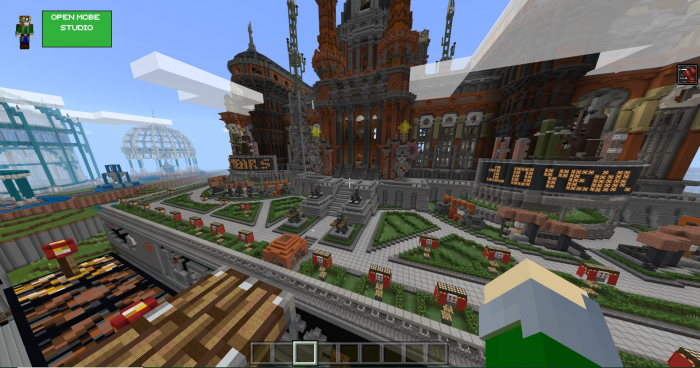
On the GUI, there is a button called "Open MCBE Studio". Due to the lack of event handler in the API for now, the only way on windows 10 to open the main interface is to open any game interface (pause, inventory, chat...), put the mouse cursor where the button is, and exit the interface with keyboard.
On android phone, just tap the button to open the interface.
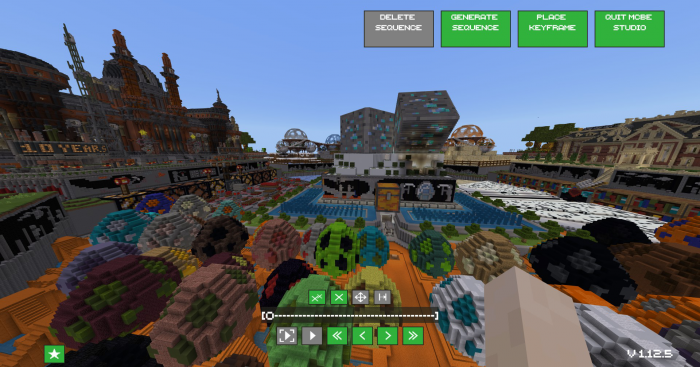
The main interface contains several buttons :
- "Generate sequence" make the sequence playable when all keyframes are placed. Edition is not allowed when the sequence is generated.
- "Place Keyframe" is a button to enter in keyframe placement mode
- "Delete sequence" remove the generated sequence and allow again to edit the timeline.
Below the timeline, there are some buttons to go to the previous and the next frame, to the first and the last one, a play/pause button, and a button to play the sequence without any GUI. Just left clic or hit your screen on your android phone to go back to the GUI.
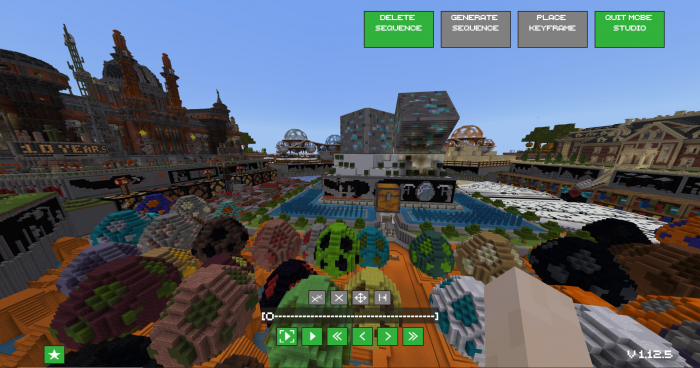
Above the timeline, there are some controls to edit keyframes before sequence generation. For the moment, only keyframe deletion is working, with a button for the current keyframe and for all the keyframes, but options to move a keyframe or insert a cut into the sequence are coming in a future update.
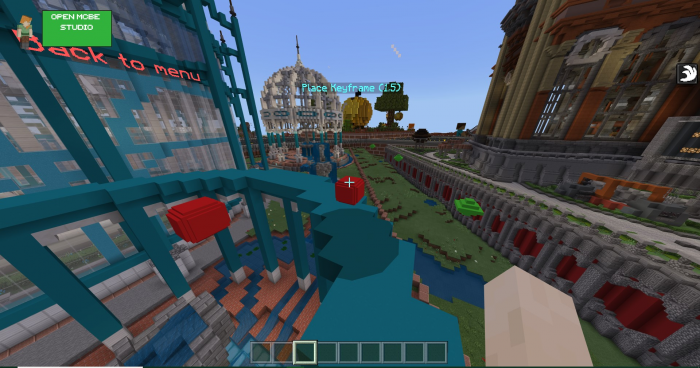
On keyframe mode, punch the marker in front of you to place a keyframe, and to exit keyframe mode, stop moving, and turn to punch the other one.
A number is written on top of place keyframe marker, it indicate the ratio between the distance between the last marker placed and the current marker, and the distance between the last and the one before. If the number is 1 on all keyframes, the sequence speed will be the same. A number of 0.5 will slow the sequence 2 times for example.
Video Showcase (old version)
About addon updates :
Update versions will be labeled using X.Y.Z format. X.Y is the current targeted Minecraft version, and Z is the incremental version number for the addon for this game version.
Except for 1.12, the target minecraft version will alway be the current game release. Support will be provided for the beta only if it's possible to support both with the same code.
Please leave feedbacks and consult changelogs on github (link below)
Links
- Discord server (updates changelog, feedback, bugs...)
- Donate (paypal)
- Donate (patreon)
About android support
This addon is now compatible with android using blocklauncher. As this application is not an official solution to run the scripting API on android, some android-specific issues may occur and I'm not sure I will be able to fix all of them.
To use this addon on android, just launch the .mcaddon on your phone with regular Minecraft, then run block launcher and enable scripts, then restart block launcher.
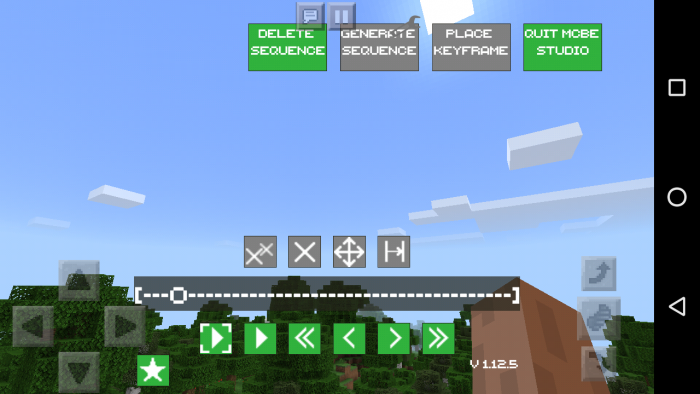
A custom UI for the main screen is provided in the android package, that fit the existing touch UI. Other screens will be updated in the next update, depending of your feedbacks.
Select version for changelog:
- Now compatible with android with blocklauncher. Need feedbacks about possible bugs and about the interface provided in the android package.
- Sequence deletion and deletion of all keyframes have been split in 2 different buttons.
- Sequence deletion no longer ask to confirm
- All keyframe deletion button now ask to confirm in a better way
- Buttons not intended to be used in some cases are now gray out.
- Fixed some issues
- Updates credits. (thanks to DJTM for donation)
Installation
Only works on 1.12 windows 10 and android with last version of blocklauncher.
Not working with 1.13 betas for the moment.


54 Responses
How can i fix it?
I just have an iphone and i hate it!
It would be so cool if you could add ios before 2k20!
Pls fix this issue Franswa
There Is A Green Background Button (Open MCBE Studio) In The Top Left, When I Tap On That Button, It Dont Shows The Interface, I Mean, "OPEN MCBE STUDIO" Is Not Touchable.
Note: 1. I Am In 1.12,
2. I Enabled Experimental GamePlay,
3. I Enabled Scripts In Blocklauncher.
Then Why Its Not Working?
2) Have you enabled experimental features on your world?
3) If on android, have you enabled scripts in blocklauncher options?
(the one in the article expired)
Moreover, that use is mostly for servers admins, a plugin for focketmine would be more adapted.