
MCPE DL

Mods, Maps, Skins, Seeds, Texture Packs

Published on September 02, 2019 (Updated on January 21, 2021)

Hybred's Skin Pack

What is this skin pack?

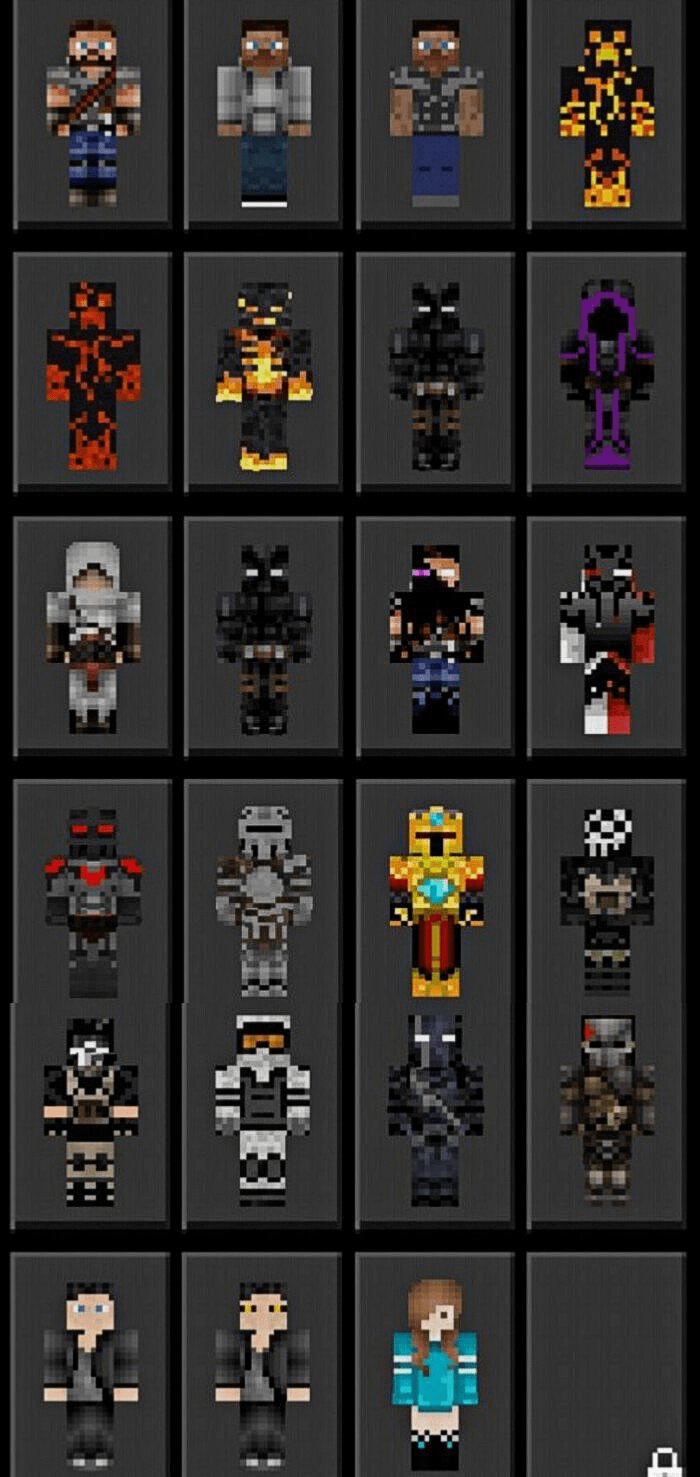
Hybred's skin pack is a compilation of every skin I have posted on the Skindex over the years, many have thousands of downloads and hundreds of likes. Now being brought back to MCPEDL with even more content!
What skins are in it?
This skin pack contains man y human skins, creeper skins, medieval, anything that looks cool is in this skin pack! We also have assassins, knights, mercenaries, military and more

Information
Join my Discord server to share your own packs or to download others

Follow me on Twitter for updates & YouTube for videos
Terms Of Use
You are prohibited from creating your own link for this pack or using the direct link. You must link this page
You are allowed to edit this for your personal use without redistribution

MADE BY


Select version for changelog:

Changelog

Updated the pack to the latest versions of Minecraft including the betas

Installation


How To Bypass Linkvertise

1. Click on "Free Access with Ads"

2. Click on "Discover interesting articles"

3. Wait 10 seconds then exit out of the articles

4. Click "Continue"


How To Get Custom Skin Packs On Xbox

Supported Minecraft versions

30 Responses

Comments 30
4.1 / 5 (20 votes)
1
Unable to parse pack manifest with stack: * Line 13, Column 14
Missing ',' or '}' in object declaration
Log in to Reply
1
It's a great skin pack im going to use it!
Log in to Reply
Hey I'm wondering if I can get the red and white corupt skin I would like to make a green and white version for my YouTube channel
Log in to Reply
1
None of my packs are discontinued I will still update them just not on MCPEDL. Follow my Twitter or join my Discord to download the latest updates. Links are in the description of this post.
Log in to Reply
Whats your discord?
Log in to Reply
are you blind?
Log in to Reply
How do I do it for Xbox?
Log in to Reply
can you do an xxxtentacion pack plz
Log in to Reply
Can you get media fire file? so we won't half to go to the real media fire page because I don't know how to do it on my Xbox
Log in to Reply
1
Yeah, I'm questioning why they'd use a folder. I've attempted the process with this and it doesn't function. It looks like it'd be a decent skin package too. Such a shame.
Log in to Reply
1
The reason I use a folder is because I can update the folder at anytime instantly but if I used a normal mediafire link I would have to submit an update, delete the old link and post it here which causes two problems. 1. People trying to download it at the time of MCPEDL accepting my update will say the link is broken and doesn't work and 2. There have been major bugs that needed quick hotfixes that I had to wait an entire 36 hours before people could get it. I understand it may not work for you but this works best for most people and I am sorry if it has negatively affected you.
Log in to Reply
Thanks man, Everything works as it should.
Log in to Reply
Here is a tutorial on how to install it on a pc

DISCLAIMER: I am not the creator but I just know that for some people this could be frustrating

go to this filepath: C:\Users\USER\AppData\Local\Packages\Microsoft.MinecraftUWP_8wekyb3d8bbwe\LocalState\games\com.mojang\skin_packs

NOTE: replace USER (in caps) with your username for your computer

make a new folder in there and name it what you want the pack to be displayed as in your game. then move every file in the zipped file into that folder, and boom! your done. you might need to restart your game if its open at the same time as you did this process
Log in to Reply
Dosnt install on xbox instructions un clear
Log in to Reply
Make a call of duty skin pack like blackout characters or something.
Log in to Reply
Yeah a technoblade skin pack would be cool
Log in to Reply
1
Don't work for Xbox, I tried to transfer it to the game and the collection is not visible.
Log in to Reply
It does not work for please tell me how or send me a link
Log in to Reply
1
Don't use a folder lmfao ?.
Log in to Reply
You need to press the home button and sign out while still in minecraft, then when theres a steve/alex skin on the right side of the screen sign back in. If that doesn't work its just you.
Log in to Reply
Can u add Technoblade, or even make a Minecraft Monday Skin Pack
Log in to Reply
1
Can you maybe make a human with brown eyes? love the pack keep up the great work!
Log in to Reply