

This resource pack was created to make Minecraft: Bedrock Edition a lot more clearer and detailed in terms of textures as much as possible. It changes things such as sides of a sticky piston, visual observer texture when activated, and a lot more...
The main idea of this resource pack is to implement all the possible useful tools for making redstone systems professionally by distinguishing between similar textures easily.
It's probably the most recommended resource pack for redstoners and technical players on Bedrock.
So if you’re a redstone guy or just someone who wants to make life easy, this is definitely the pack for you!
[Showcase Video] Clear Vanilla Resource Pack
Clear Vanilla Settings:
- You can now choose the way you prefer the textures of chests and other components in general: 'Smooth' / 'Classic' / 'Tweaked'.
- To update the option you chose properly, go back to the menu after, exit Minecraft and open again.
What's New?
- Connected String - retexture to make a clear difference between a connected string and an unconnected string.
- Repeater - added textures from all sides with powered repeater texture!
- Comparator - added textures from all sides with powered comparator texture!
- Redstone Dust - 'Smooth' or 'Classic' texture, with a number on top of the dust which indicates the signal strength!
- Redstone Torch - retextured with 3 different textures: 'Smooth' / 'Classic' / 'Tweaked'.
- Torch - retextured with 3 different textures: 'Smooth' / 'Classic' / 'Tweaked'.
- Soul Torch - retextured with 3 different textures: 'Smooth' / 'Classic' / 'Tweaked'.
- Rails - retextured with 3 different textures: 'Smooth' / 'Classic' / 'Tweaked'.
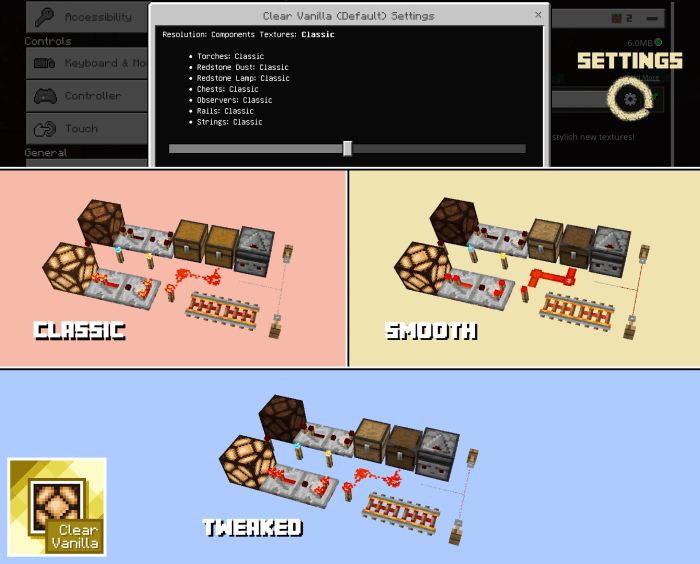
Pay attention! signal strength indication available on mobile devices only since RenderDragon.
- Redstone Lamp - slightly more darker to make a clear difference between redstone lamp off and redstone lamp on.
- Observer - completely new texture which represent observer activation.
- Hoppers - directional arrows with a locked hopper texture.
- Anvils - retextured to make a clear difference between other states of anvils.
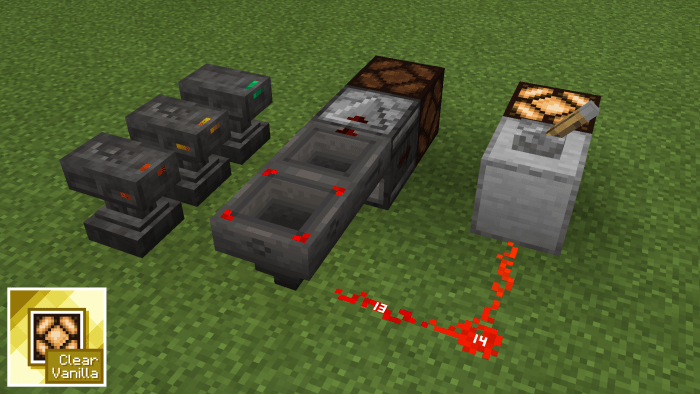
Pay attention! you can keep the classic redstone lamp texture by choosing 'Classic' option in settings.
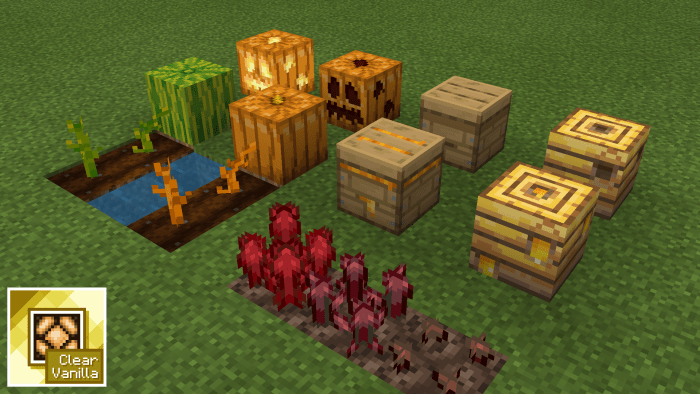
- Melon Seeds - retextured to make a clear difference between melon seeds and pumpkin seeds.
- Pumpkin Seeds - retextured to make a clear difference between melon seeds and pumpkin seeds..
- Carved Pumpkin - retextured from all sides to make a clear difference between the 3 pumpkin types!
- Jack o'Lantern - retextured from all sides to make a clear difference between the 3 pumpkin types!
- Nether Wart - retextured to make a clear difference between other stages of nether wart.
- Beehives - retextured to make a clear difference between other stages of beehives.
- Bee Nests - retextured to make a clear difference between other stages of bee nests.
- Regular Piston - retextured from all sides to make a clear difference between a sticky piston and a regular piston.
- Sticky Piston - retextured from all sides to make a clear difference between a sticky piston and a regular piston.
- Dropper - retextured from all sides to make a clear difference between a dropper and a dispenser.
- Dispenser - retextured from all sides to make a clear difference between a dropper and a dispenser.

- Smoker - added a lit smoker texture from all sides with fire animation.
- Blast Furnace - added a lit blast furnace texture from all sides with fire animation.
- Furnace - added a lit furnace texture from all sides with fire animation.
- Barrel - retextured from all sides to make a clear difference between a closed barrel and an open barrel.
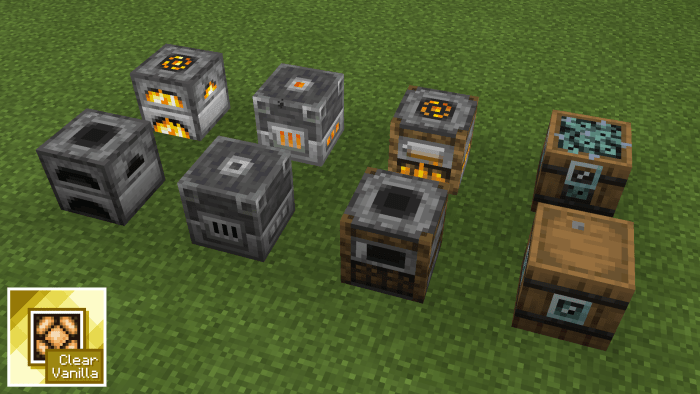
Opened barrel texture. Just to tell the difference when someone opens a barrel and you see it from the side of the block.
- Respawn Anchors - retextured from all sides to make a clear difference between other stages of respawn anchors.
- Soul Campfire - retextured to make a clear difference between soul campfires and regular campfires.
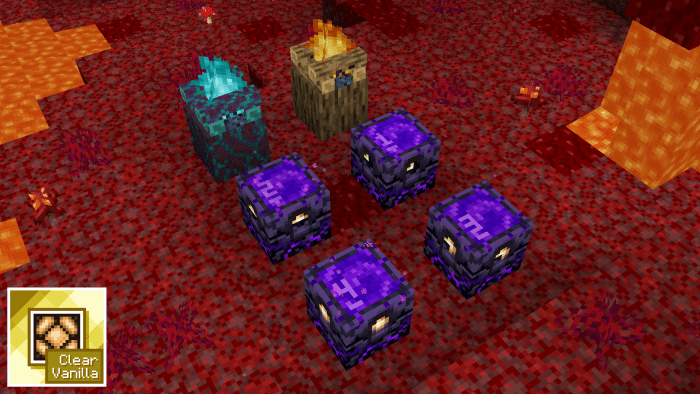
The numbers on the top and bottom indicate the number of glowstone you have left.
- Trapped Chest - retextured to make a clear difference between regular chests and trapped chests.
- Regular Chest - retextured to make a clear difference between regular chests and trapped chests.
- Ender Chest - retextured from inside to match with the other chests.
- Jukebox - retextured to make a clear difference between a side of a jukebox and a side of a noteblock.
- End Portal - retextured to make a clear difference between a bottom of end portals and a bottom of end stones.
- Enchantment Table - retextured to make a clear difference between a bottom of enchantment tables and a borrom of obsidian blocks.
- Stonecutter - retextured to make a clear difference between a bottom of stonecutters and a bottom of smooth stone blocks.
- Lectern - retextured to make a clear difference between a bottom of lecterns and a bottom of oak planks.
- Crafting Table - retextured to make a clear difference between a bottom of crafting tables and a bottom of oak planks.
- Fletching Table - retextured to make a clear difference between a bottom of fletching tables and a bottom of birch planks.
- Cartography Table - retextured to make a clear difference between a bottom of cartography tables and a bottom of dark oak planks.
- Smithing Table - retextured the bottom.
- Loom - retextured the bottom.
- Daylight Sensor - retextured to make a clear difference between the two modes of daylight sensors.
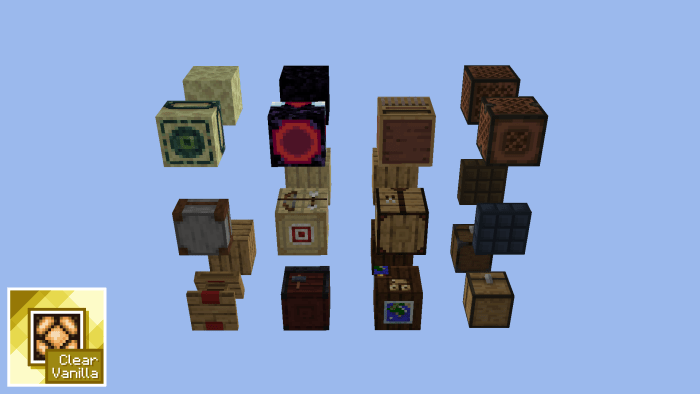
Pay attention! you can keep the classic chest texture by choosing 'Classic' option in settings.
- Pressure Plates - retextured to make a clear difference between pressure plates and their corresponding block.
- Buttons - retextured to make a clear difference between buttons and their corresponding block.
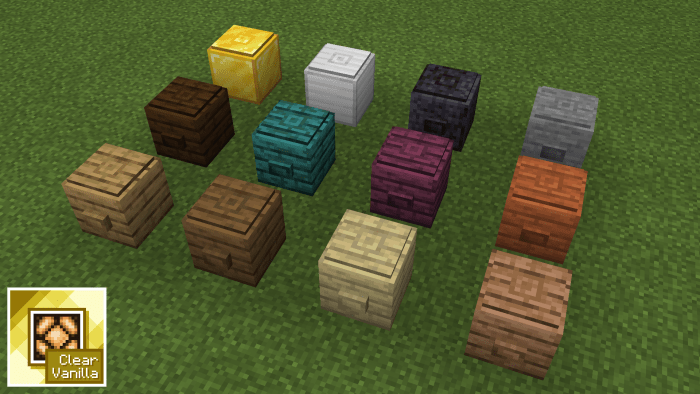
- Infested Stone Blocks - retextured to make a clear difference between regular stone blocks and infested stone blocks.
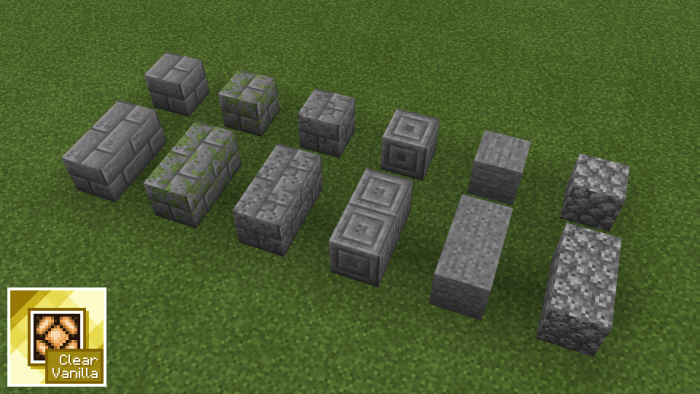
- Terracotta & Wool Blocks - retextured, added borders to them with option to go back to original textures by choosing 'Classic' option.
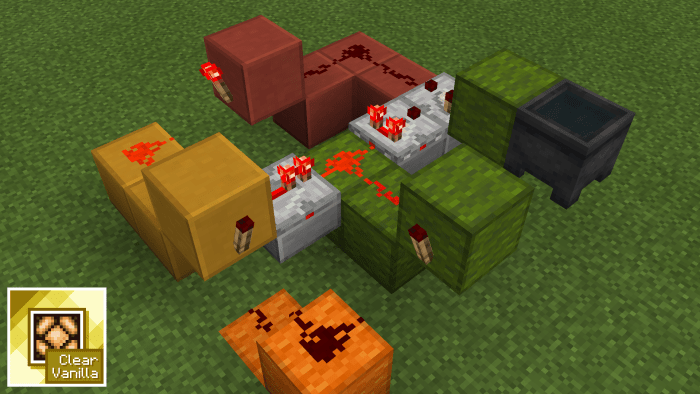
Comparisons Between Packs:

Clear Vanilla Lite: without some of the features to improve performance.
- Clear Vanilla (Default): Clear Vanilla, with the default texture pack of Minecraft.
- 精细纹理 (Default): Clear Vanilla for China Edition, with the default texture pack of Minecraft.
- Clear Vanilla (Classic): Clear Vanilla, with the classic texture pack of Minecraft.
- 精细纹理 (Classic): Clear Vanilla for China Edition, with the classic texture pack of Minecraft.
Contact & Information - suggest things / report bugs:
- Twitter: @melamed_tal.
- YouTube: ExtraLogic.
- Gmail: [email protected].
- Credits: bottom of respawn anchor texture for Clear Vanilla Lite from: Better Respawn Anchor. Beta & marketplace hider resource pack and icons of beds by @agentms_. Icon of beetroot & fishing rod, top texture of scaffholding from: New Default+. Melon & pumpkin seeds, better signs, fixed observer & back of painting texture, nicer fast leaves, quick crafting button and better trading panel from Bedrock Tweaks. Connected string, redstone dust signal indication and a lot of classic textures by @McbeEringi & @oeotyan. Trapped & regular chest from: Sirhc's Tweaked Vanilla. Spawn eggs textures from: Eggmoticons. Potions textures from: Better Potions. Detailed items from: Hunger Points on Food Names.
Select version for changelog:
- Changed UUID for each pack so you can download new updates without having to delete the olds.
- Updated top texture of blast furnace.
- Retextured terracotta blocks textures + added an option in settings to change that by choosing 'Classic' option.
- Campfires now have smoke again.
Installation
- Use the latest Minecraft version to access all the features of this resource pack.
- This resource pack tested on Windows 10 and mobile device only - it might not work on all other platforms.
- This resource pack may not work properly on Realms.
- Do not active external resource packs to prevent issues.
- Do not copy and publish the textures or the code of this resource pack without my permission.
- If you're experiencing with low performance, use Clear Vanilla Lite - read all the differences above to see the comparisons.
- Choose the mode you prefer in the settings of this resource pack: 'Tweaked' / 'Classic' / 'Smooth' - read all the differences above to see the comparisons.
- To update the mode you chose properly, go back to the menu after, exit Minecraft and open again.


254 Responses
spawn egg doesn't show the right texture
Please fix this
Thanks!
[email protected]
If you can make that i will give max rating
Please respect my decision and if you are having trouble downloading, there is a direct link on Planet Minecraft: https://www.planetminecraft.com/texture-pack/clear-vanilla-resource-pack/
For any other issues contact me via email: [email protected]
Have a great day!
(I put on a different thing So I'm Sorry Tal Melamed)
If not, better not to download to prevent errors.
And I want the original version of your work without shaders
And, I can download your Pack and the Chunk Border without downloading multiple files.
You can download the pack without the shaders by downloading Clear Wire Lite. Please read "comparisons between packs". You can download Chunk Border and my pack and use together but don't use additional packs, also you should active Chunk Border lastly. For more help you can massage me directly via email or twitter. Happy to help :)
1. Play the latest Minecraft vesrion (1.16)
2. Play on a mobile device / Windows 10.
3. If still happens, download Clear Wire Lite (it's without shaders so it must work for all players).
https://www.mediafire.com/folder/49gwmzzih86yu/Clear Wire - Detailed Vanilla Resource Pack
If you have issues you can contact me via Twitter or email
[email protected]
Just want to thank you. I'm really grateful for this pack. It's very useful!
BEMZ
Unfair Minecraft.
Minecraft Marketplace creator
You should probably play on 1.16, I guess you are using older versions
Pigman ear is disappear
EmIl: [email protected]
I don't think I will add a new option for that in settings, however it is possible to implement that.
This is very useful and I recommend you to use it...
Your are cool ????
How can I change the redstone dust to make it really clear(no number for detecting the redstone power)
I really happy if you can help me with this thing
BTW this addon is really cool
And no, some people complains about that a lot.
And also, the soul campfire is looking better.
I see comments about the honey comb and nest, how about making small holes that leaks out honey?
And for the nether anchor thingy, instead of number, how about golden dots (like dice) so it can be seen from every angle?
Also,also, one more thing. Can you make the locked hopper's sides (the arrows) also glows?
can you ptimize the pack ?
I added Clear Wite Lite file for download - it runs smoother and without block animation, settings interface.
I always listen to community feedback :)
I will try to fix them next update :)
1. Do not change redstone torches textures they look solid (I know they are made out of 2 colors only but they don't look "BETTER" than vanilla textures)
2. The numbers on redstone wire are too big.
3. Melon and pumpkin plants should not be completely orange or green. maybe just the head of the plant get a color.
4. The trapped chest is a "TRAPPED" chest. don't change the texture -_-
5. the bottom of crafting table. idk why you did that you are great I mean you thing the way that mojang does for making textures. but not in this one.
6. Bee nests. This looks really stupid. FULLY YELLOW. you could just add more holes in other sides if you wanted to make a Big difference.
7. Personally hated the stone, cobblestone, etc texture
8. You messed up with soul campfire
About nunber 4, you can change the texture in the settings. Just read this forum again to see how.
About number 2, I can't to anything about it - limitations with scripting on bedrock...
About the bee nests, the point of the texture is to make it look covered with honey.
Good texture pack tho, when I can play it
But do not use additional resource packs together.
you can contact me:
[email protected]
Twitter: @melamed_tal
However, if you have problems with downloading you can contact me via email / twitter and I will send you a link.
Anyway, just by looking at this pack, I give it 5 stars!
:)
The link is ok, if you have problems with downloading, please contact me:
Email: [email protected]
Twitter: @melamed_tal
Next update will be lit ?
And yes, but in the next update
Right now it seems like there are problems with the links...
For now please download the pack from here and I will fix it very soon!
Download Clear Wire v3.1.0 [mcpack]: http://raboninco.com/HD0s
Thanks for your patience, and for any problem, please contact me! I can always help:
Twitter: @melamed_tal
Email: [email protected]
For now, please download from here: http://raboninco.com/HD0s
For now, please download from here: http://raboninco.com/HD0s
Please update me to let me know:
Email: [email protected]
Twitter: @melamed_tal
But I can always help! contact me here:
Email: [email protected]
Twitter: @melamed_tal
First of all I guess you mean hoppers, not droppers.
Secondly BedrockTweaks have only the top hoppers texture & code - and:
1. Different textures.
2. Locked hoppers from sides.
3. I didn't use your code, even for the top hoppers.
So my resource pack is entirely different...
But... you can download it and delete the "shaders" file - that will do the trick!
Thank you~
My texture is different tho. Great texture pack for redstoners btw!
But I have a cuestión?
Work with another texture packs 32x32?
And yea, I think so.
https://vanillatweaks.net/
And the observer top side's beautiful