

The mod implements an advanced car system with a custom car model and a unique graphical user interface specifically constructed for this mod. Besides the car system it also adds blocks which can function as roads to travel on using the car. The roads don't yet have any crafting recipes so you will have to use the Too Many Items mod to spawn them.
Creator: akharote1
How to use the car?
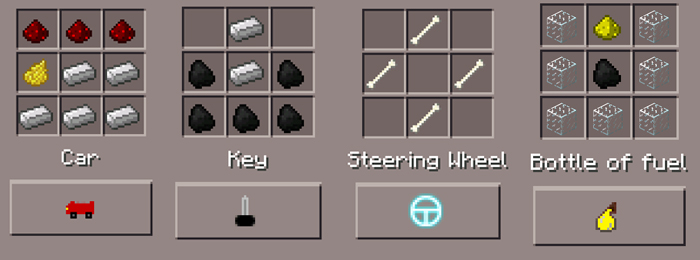
Begin by crafting a car with 3 redstones, 5 iron ingots and 1 dandelion yellow. Craft a key with 5 coal and 2 iron ingots. Place down the car in front of you and use the key on the car to enter it. [gallery link="file" columns="2" size="medium" ids="8753,8755"] When you put the steering wheel item in your hand you will be able to control the vehicle using two new graphical user interface buttons in the bottom-left and bottom-right corners of the screen.Item & Block IDs & Crafting Recipes
- Key (368) - 2 iron ingots + 5 coal
- Car (461) - 3 redstones + 1 dandelion yellow + 5 iron ingots
- Steering Wheel (462) - 4 bones
- Bottle of Fuel (463) - 7 glass blocks + 1 glowstone dust + 1 coal
- Road Block (Normal) (252)
- Road Block (Line) (251)
- Road Block (Corner) (250)
- Road Block (Intersect) (242)
How to install?
The install process is a little bit different from how it usually works so lets have a look.- Download the files by tapping on the download button further down.
- Install the ModPE script (.js file) as usually.
- Copy the CarsMod folder from the Download folder to the root of sdcard. It's the same folder as where the Download folder is located.
- Use BlockLauncher Pro to install the texture pack.
- Done!


10 Responses
And command